Superset
Service #
Apache Superset is a modern data exploration and visualization platform URL
Highlights #
Superset is fast, lightweight, intuitive, and loaded with options that make it easy for users of all skill sets to explore and visualize their data, from simple line charts to highly detailed geospatial charts.
Powerful yet easy to use #
Quickly and easily integrate and explore your data, using either our simple no-code viz builder or state of the art SQL IDE.
Integrates with modern databases #
Superset can connect to any SQL based datasource through SQLAlchemy, including modern cloud native databases and engines at petabyte scale.
Modern architecture #
Superset is lightweight and highly scalable, leveraging the power of your existing data infrastructure without requiring yet another ingestion layer.
Rich visualizations and dashboards #
Superset ships with a wide array of beautiful visualizations. Our visualization plug-in architecture makes it easy to build custom visualizations that drop directly into Superset.
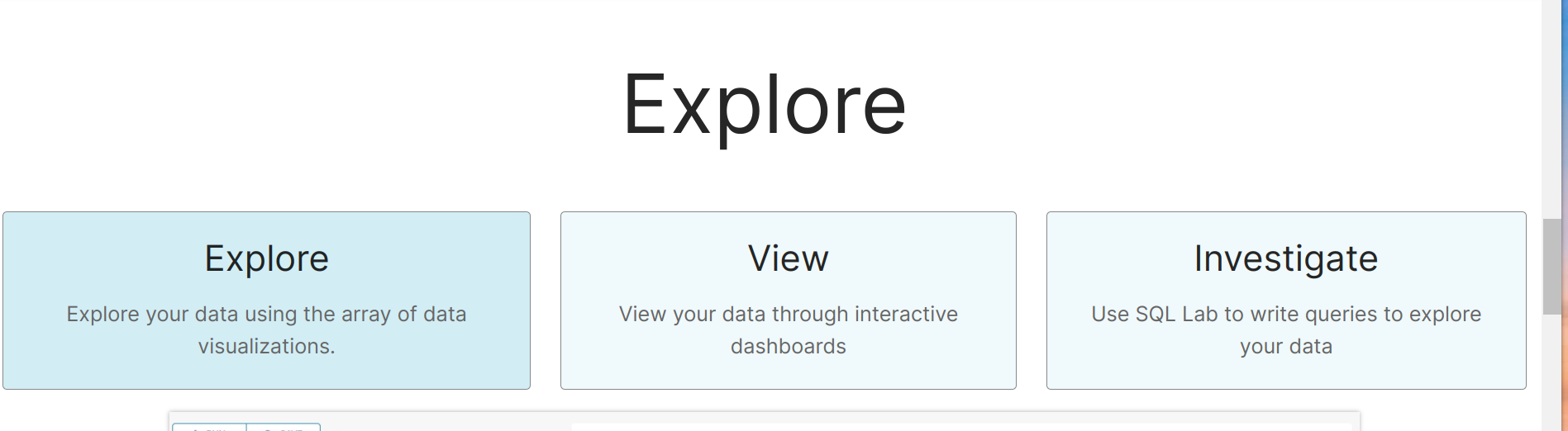
Explore view and investigate #
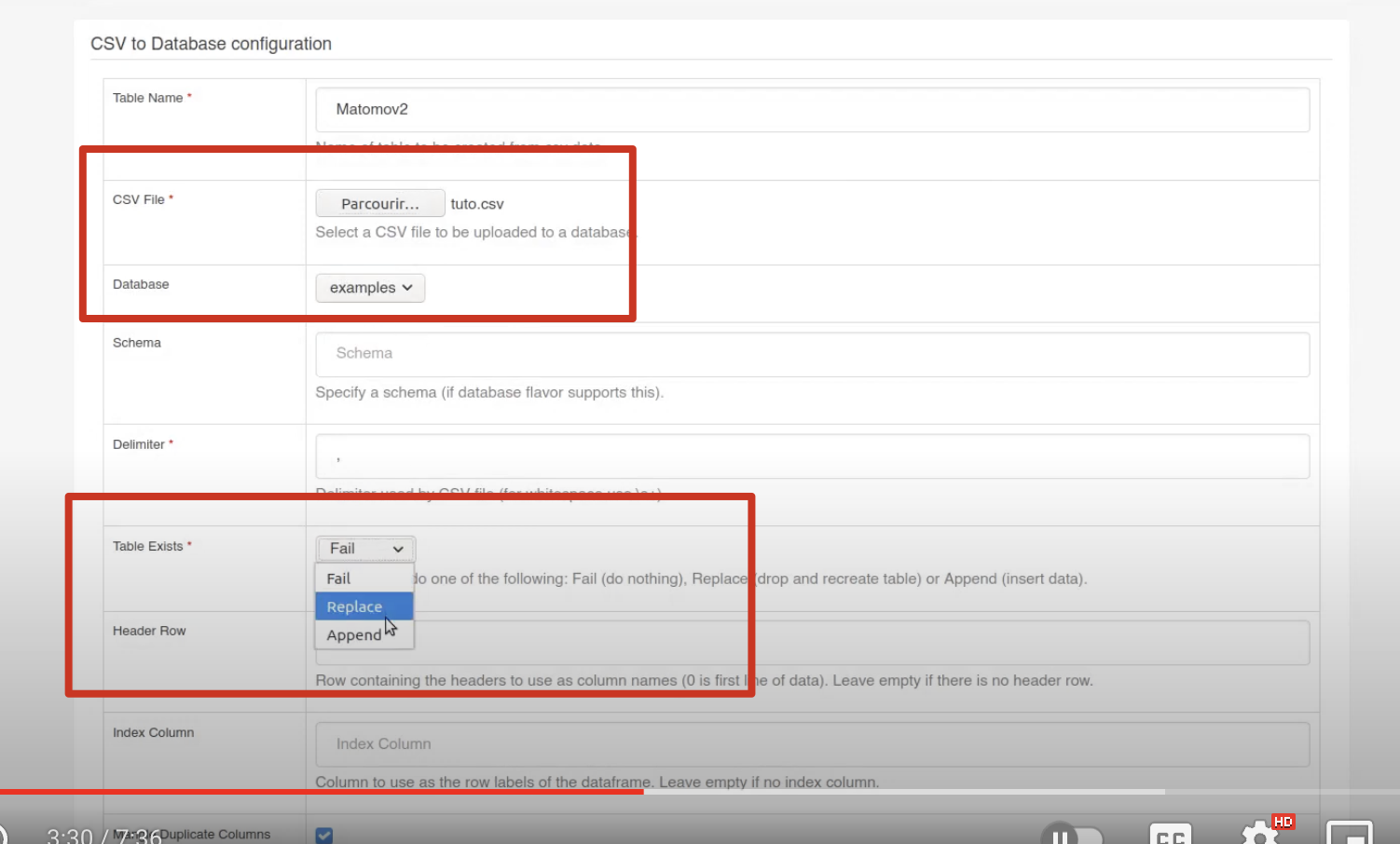
Importing CSV #
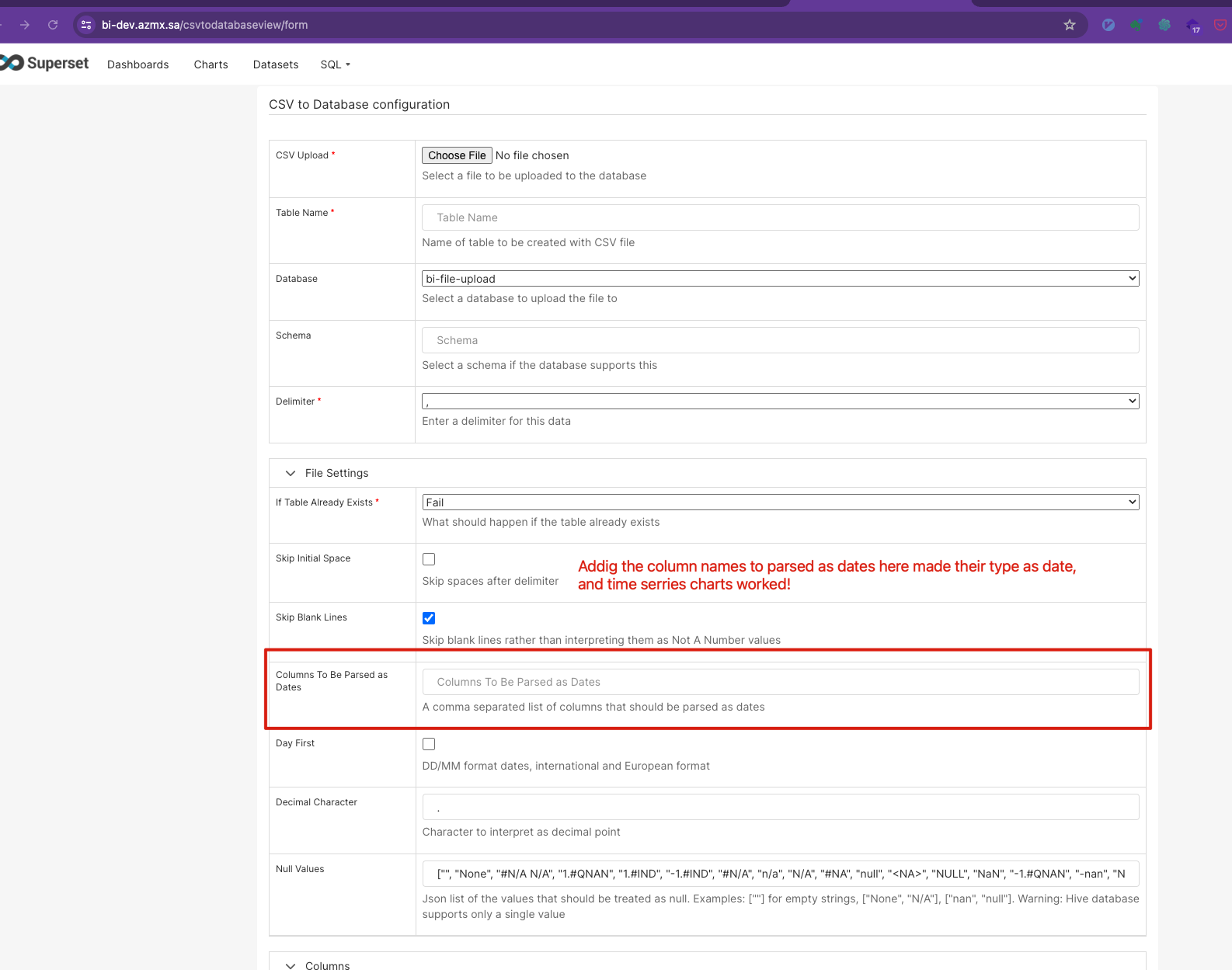
Parsing Columns with Date or Datetime #
Installation with Docker and Google SSO #
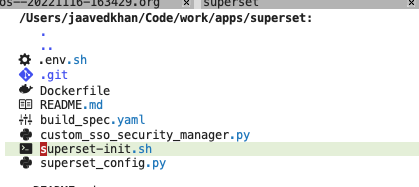
Dockerfile #
FROM apache/superset

USER root

# RUN pip install mysqlclient
RUN pip install psycopg2==2.9.9
RUN pip install Authlib==1.3.1
RUN pip install gsheetsdb==0.1.13.1
RUN pip install shillelagh==1.2.10
RUN pip install pandas_gbq==0.23.1

ENV ADMIN_USERNAME $ADMIN_USERNAME
ENV ADMIN_EMAIL $ADMIN_EMAIL
ENV ADMIN_PASSWORD $ADMIN_PASSWORD

COPY ./superset-init.sh /superset-init.sh

# set executable permissions
RUN chmod +x /superset-init.sh

COPY superset_config.py /app/
COPY custom_sso_security_manager.py /app/
ENV SUPERSET_CONFIG_PATH /app/superset_config.py

USER superset
ENTRYPOINT [ "/superset-init.sh" ]
supserset-init.sh
#!/bin/bash

# create Admin user, you can read these values from env or anywhere else possible
superset fab create-admin --username "$SUPERSET_ADMIN_USERNAME" --firstname Superset --lastname Admin --email "$SUPERSET_ADMIN_EMAIL" --password "$SUPERSET_ADMIN_PASSWORD"

# Upgrading Superset metastore
superset db upgrade

# setup roles and permissions
superset superset init

# Load examples
superset load_examples

# Starting server
/bin/sh -c /usr/bin/run-server.sh
supserset_confiy.py
#  https://github.com/apache/superset/blob/master/superset/config.py
import os
import base64

FEATURE_FLAGS =
    "ENABLE_TEMPLATE_PROCESSING": True,


ENABLE_PROXY_FIX = True
SECRET_KEY = os.environ["SUPERSET_SECRET_KEY"]


FEATURE_FLAGS =
    "ALERT_REPORTS": True,
    "EMBEDDED_SUPERSET": True,
    "EMBEDDABLE_CHARTS": True,


# #TODO limit to hosted domain only
# CORS_OPTIONS =
#   'supports_credentials': True,
#   'allow_headers': ['*'],
#   'resources':['*'],
#   'origins': ['*']
#

db_username = os.environ["SUPERSET_DB_USERNAME"]
db_password = os.environ["SUPERSET_DB_PASSWORD"]
db_host = os.environ["SUPERSET_DB_HOST"]
db_host_port = os.environ["SUPERSET_DB_PORT"]
db_name = os.environ["SUPERSET_DB_NAME"]
SQLALCHEMY_DATABASE_URI = (
    f"postgresql://db_username:db_password@db_host:db_host_port/db_name"
)
print("using postgres")


# SSO
from flask_appbuilder.security.manager import AUTH_OAUTH

# this is not mandatory for google
# https://medium.com/towards-data-engineering/setup-google-authentication-for-superset-caafa290626
# from custom_sso_security_manager import CustomSsoSecurityManager
# CUSTOM_SECURITY_MANAGER = (
#     CustomSsoSecurityManager  # For managing User data after fetching from SSO app
# )

# Set the authentication type to OAuth
AUTH_TYPE = AUTH_OAUTH

client_id_secret = (
    os.environ["SUPERSET_OAUTH_CLIENT_ID"]
    + ":"
    + os.environ["SUPERSET_OAUTH_CLIENT_SECRET"]
)
client_id_secret_base64 = base64.b64encode(client_id_secret.encode()).decode()

# OAUTH_PROVIDERS = [
#
#         "name": "google",
#         "token_key": "access_token",  # Name of the token in the response of access_token_url
#         "icon": "fa-google",  # Icon for the provider
#         "remote_app":
#             "client_id": os.environ["SUPERSET_OAUTH_CLIENT_ID"],
#             "client_secret": os.environ["SUPERSET_OAUTH_CLIENT_SECRET"],
#             "client_kwargs": "scope": os.environ["SUPERSET_OAUTH_SCOPES"],
#             "jwks_uri": "https://www.googleapis.com/oauth2/v3/certs",  # Uri for token creation
#             "access_token_method": "POST",  # HTTP Method to call access_token_url
#             "access_token_params":   # Additional parameters for calls to access_token_url
#                 "client_id": os.environ["SUPERSET_OAUTH_CLIENT_ID"],
#             ,
#             "access_token_headers":   # Additional headers for calls to access_token_url
#                 "Authorization": f"Basic client_id_secret_base64",
#                 "Content-Type": "application/x-www-form-urlencoded",
#             ,
#             "authorize_url": "https://accounts.google.com/o/oauth2/auth",
#             "access_token_url": "https://accounts.google.com/o/oauth2/token",
#             "userinfo_endpoint": "https://www.googleapis.com/oauth2/v1/userinfo",
#         ,
#
# ]


OAUTH_PROVIDERS = [

        "name": "google",
        "icon": "fa-google",
        "token_key": "access_token",
        "remote_app":
            "client_id": os.environ["SUPERSET_OAUTH_CLIENT_ID"],
            "client_secret": os.environ["SUPERSET_OAUTH_CLIENT_SECRET"],
            "jwks_uri": "https://www.googleapis.com/oauth2/v3/certs",
            "api_base_url": "https://www.googleapis.com/oauth2/v2/",
            "client_kwargs": "scope": os.environ["SUPERSET_OAUTH_SCOPES"],
            "request_token_url": None,
            "access_token_url": "https://accounts.google.com/o/oauth2/token",
            "authorize_url": "https://accounts.google.com/o/oauth2/auth",
            "authorize_params": "hd": "https://web-server.domain.xyz"
        ,

]

print(OAUTH_PROVIDERS)

# Will allow user self registration, allowing to create Flask users from Authorized User
AUTH_USER_REGISTRATION = True

# The default user self registration role
# Can change it to Gamma if want user to have dashboard view
# enable for creating first admin
# AUTH_USER_REGISTRATION_ROLE = 'Admin'
# then use this role
AUTH_USER_REGISTRATION_ROLE = "Public"
Datasets #
Summary #
Enabling Data Upload #
To upload data such as CSV files, enable the ‘Allow Data Upload’ option in your Database configuration.
To create time series
charts the data should be in
17/03/2017 2:09:30 AMthis is required format in Postgres, else
Semantic Layer #
Superset’s semantic layer allows for the creation of virtual metrics and calculated columns, enhancing data analysis without altering the underlying data source. ref
A semantic layer is an abstraction layer that sits between the raw data stored in a database (data warehouse or data lake) and the business intelligence (BI) tools used for data analysis and visualization.
The goal of a thin semantic layer then is to primarily enable last mile data transformation for the explicit purpose of visualization in your BI tool.
Datasets and Macros #
Utilize the dataset macro to query datasets directly in SQL Lab, including computed columns and metrics.
Registering New Tables #
Add new tables to Superset by navigating to ‘Data > Datasets’ and using the ‘+ Dataset’ button.
Column Customization #
Customize column properties to define how they should be treated in the Explore workflow, such as making them filterable or setting them as temporal.
Physical vs Virtual Datasets #
The data layer in Superset falls into two buckets: physical datasets and virtual datasets.
Physical Datasets #
A physical dataset in Superset represents a table or view in your database. Because a physical dataset reflects a real, physical table, Superset is able to automatically pull in relevant information from the database (like schema and column types). This information is saved in Superset’s metadata database. If a change to the underlying database table occurs, you can click Sync Columns from Source to force Superset to update its internal data model.
Virtual datasets #
Virtual datasets enable you to elevate a freeform SQL query against your Database into a dataset entity in Superset. Virtual datasets inherit most of the same superpowers as physical datasets:
- column types (inferred from results of running the query)
- ability to define metrics
- ability to define calculated columns
- ability to certify metrics or calculated columns
- setting a cache timeout
The fastest way to create a virtual dataset is to write and run your query in SQL Lab. Then, you can click Explore near the results tray and you’ll be asked to name the virtual dataset:
RBAC #
ref feature flags, ref stable feature flags
Security #
Provided Roles or Default Roles #
Admin #
Admins have all possible rights, including granting or revoking rights from other users and altering other people’s slices and dashboards.
Alpha #
Alpha users have access to all data sources, but they cannot grant or revoke access from other users. They are also limited to altering the objects that they own. Alpha users can add and alter data sources.
Gamma #
Gamma users have limited access. They can only consume data coming from data sources they have been given access to through another complementary role. They only have access to view the slices and dashboards made from data sources that they have access to. Currently Gamma users are not able to alter or add data sources. We assume that they are mostly content consumers, though they can create slices and dashboards.
Also note that when Gamma users look at the dashboards and slices list view, they will only see the objects that they have access to.
observation
sql_lab #
The sql_lab role grants access to SQL Lab. Note that while Admin users have access to all databases by default, both Alpha and Gamma users need to be given access on a per database basis.
Public #
To allow logged-out users to access some Superset features, you can use the PUBLIC_ROLE_LIKE config setting and assign it to another role whose permissions you want passed to this role.
For example, by setting PUBLIC_ROLE_LIKE = “Gamma” in your superset_config.py file, you grant public role the same set of permissions as for the Gamma role. This is useful if one wants to enable anonymous users to view dashboards. Explicit grant on specific datasets is still required, meaning that you need to edit the Public role and add the public data sources to the role manually.
Managing Data Source Access for Gamma Roles
Metrics #
One Dataset can have many metrics, by default a count metric will be created. ref
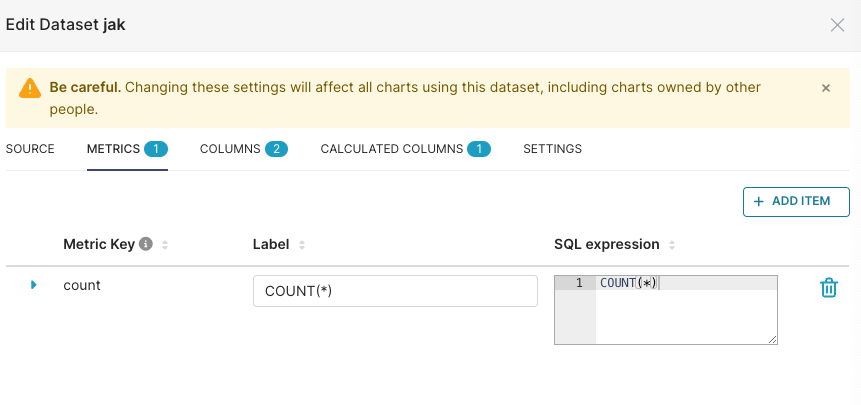 Superset’s semantic layer provides a flexible and user-friendly interface for defining custom metrics and calculated columns, enhancing the data exploration experience. Here’s an in-depth look at its capabilities:
Virtual Metrics #
Aggregate
Define metrics using SQL expressions, e.g.,
SUM(recovered) / SUM(confirmed) as recovery_rate.Utilize aggregate functions to create meaningful visualizations.
Certify metrics for team-wide recognition and consistency.
Virtual Calculated Columns #
Low level Column
Customize column behavior with SQL, e.g.,
CAST(recovery_rate AS FLOAT).Avoid aggregate functions in calculated columns to maintain granularity.
SQL Custom SQL #
ref Superset provides a lightweight semantic layer that offers significant enhancements for data analysis. Here are some key features to understand when working with custom SQL in Superset:
Virtual Metrics Create custom aggregate expressions like
SUM(recovered) / SUM(confirmed)and use them as metrics in your visualizations.Virtual Calculated Columns Transform column data with SQL expressions, such as
CAST(recovery_rate AS FLOAT), to customize how data is displayed and used in Superset.SQL Lab A powerful SQL IDE within Superset that allows you to perform complex queries, including joining multiple tables, which is not possible in the Explore view.
Database Performance The efficiency of Superset is closely tied to the performance of the underlying database. It’s recommended to optimize your database to handle the queries generated by Superset effectively.
Creating Visualizations Use the Explore interface to build charts without writing any code. Select your dataset, choose a visualization type, and customize its appearance.
Data Exploration Dive into datasets with the Explore view, leveraging a variety of columns and metrics to craft insightful visualizations.
Superset Meta Database An experimental feature that allows querying across different databases using a special syntax.
Here’s an example of how to use custom SQL in Superset’s semantic layer:
SELECT
  CASE
    WHEN sum(num) > 100 THEN 'Large'
    ELSE 'Small'
  END AS size_category
FROM
  some_table
GROUP BY
  category;
SQL Templating #
SQL Lab and Explore supports jinja templateing in queries. To enable templating, the ENABLE_TEMPLATE_PROCESSING feature flag needs to be enabled in superset_config.py. When templating is enabled, python code can be embedded in virtual datasets and in Custom SQL in the filter and metric controls in Explore. By default, the following variables are made available in the Jinja context:
- columns: columns which to group by in the query
- filter: filters applied in the query
- from_dttm: start datetime value from the selected time range (None if undefined)
- to_dttm: end datetime value from the selected time range (None if undefined)
- groupby: columns which to group by in the query (deprecated)
- metrics: aggregate expressions in the query
- row_limit: row limit of the query
- row_offset: row offset of the query
- table_columns: columns available in the dataset
- time_column: temporal column of the query (None if undefined)
- time_grain: selected time grain (None if undefined)
For example, to add a time range to a virtual dataset, you can write the following: #
SELECT *
FROM tbl
WHERE dttm_col > ' from_dttm ' and dttm_col < ' to_dttm '
You can also use Jinja’s logic to make your query robust to clearing the timerange filter:
SELECT *
FROM tbl
WHERE (
    % if from_dttm is not none %
        dttm_col > ' from_dttm ' AND
    % endif %
    % if to_dttm is not none %
        dttm_col < ' to_dttm ' AND
    % endif %
    true
)
API #
https://superset.apache.org/docs/api/
https://www.restack.io/docs/superset-knowledge-apache-superset-api-guide
- Apache Superset’s API provides
a powerful way to interact with the platform programmatically. Here’s a deep dive into its capabilities: - Superset’s REST API adheres to the OpenAPI specification, offering a range of endpoints for tasks such as querying data, managing dashboards, and configuring data sources.
- It is possible to embed dashboards in frontend applications, that does not require any API. ref
Does Superset offer a public API? #
superset_config.py
FAB_API_SWAGGER_UI = True