SSL Certificate
How it works? #
uses protocol. certificates are two things.
- First, they provide a secure connection between a website by encrypting the data that is passed between users and the domain.
- Secondly, certificates verify the ownership and identity of the business or person that owns the URL.
- Just as a certificate would in the physical world, a digital certificate is essentially certifying your right to represent your business or organization online. ref
SSL Certificate types #
Domain Validation Certificate #
refer to the simple verification of the owner of a URL
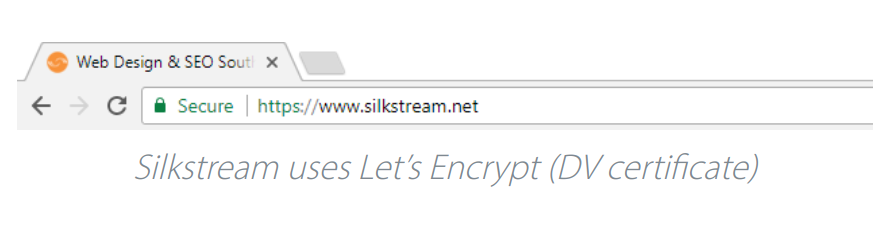
At the DV level, the process is fairly short, requiring the buyer to only demonstrate control of the domain or URL. This is done by the CA sending an email to the domain owner (as listed in the WHOIS database). While convenient if you need a certificate right away, this one-check form of validation is the lowest standard on the Internet—and should be trusted accordingly.
is the quickest and cheapest option, but has the lowest level of authentication. Company information isn’t checked or displayed on the SSL certificate but, for small business and personal websites that don’t require extensive credibility, the basic encryption and HTTPS is all you will ever really need.
Organization Validation Certificate #
verify the domain owner and authenticate the business organization affiliated with the URL.
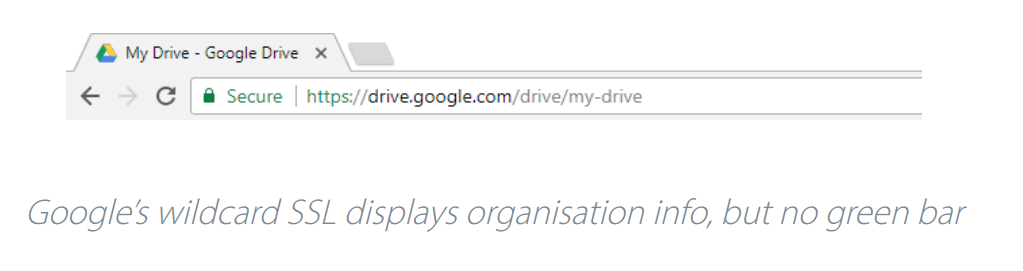
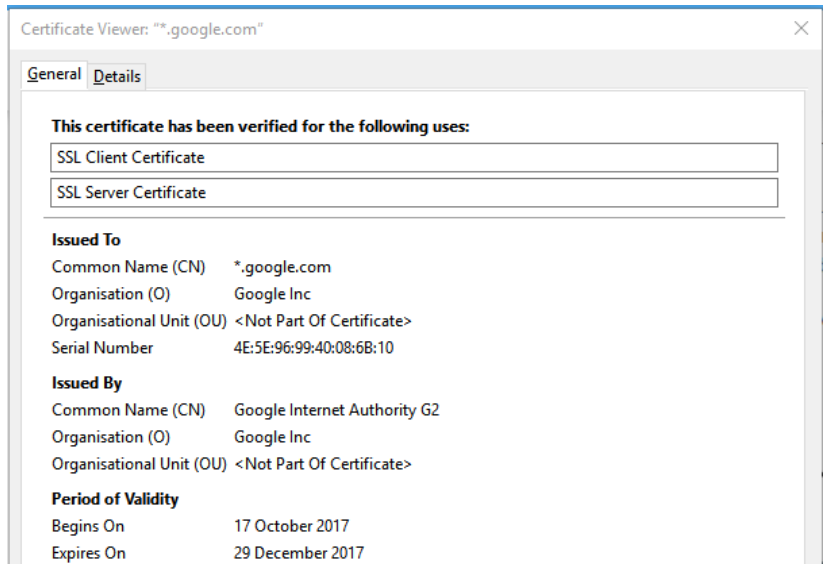
aren’t issued as liberally as DV ones as the Certificate Authority checks the credibility of the organisation or individual applying for the certificate, and the company information will be displayed to the website visitors on the certificate. This gives the website visitor more visible trust in the organisation – if they know what they are looking for. Otherwise, there is no real visual differentiation between DV and OV at a glance.
Extended Validation Certificates #
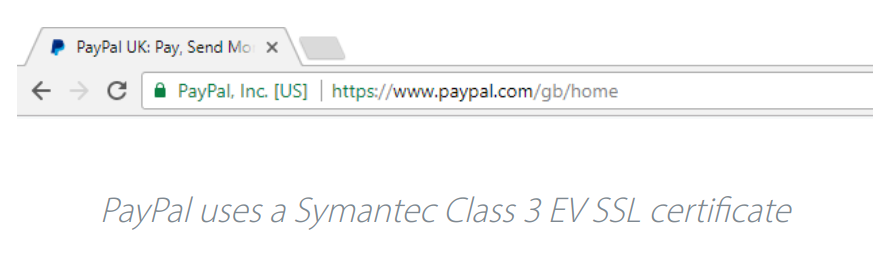 Extended Validation certificates are high assurance identity certificates because they require verification of the domain owner, business organization and the legal entity of the business involved.
What distinguishes OV & EV certificates are the extra layers and steps of validation required to obtain them. For both EV & OV certificates CAs must verify the domain owner as well as several details related to the affiliated business including name, type, status, and physical address.
With EV, nine additional steps are required including verifying a businesses’ public phone number, length of time in business, registration number and jurisdiction, as well as a domain fraud check, contact blacklist check and a telephone call to authenticate the employment status of the requestor.
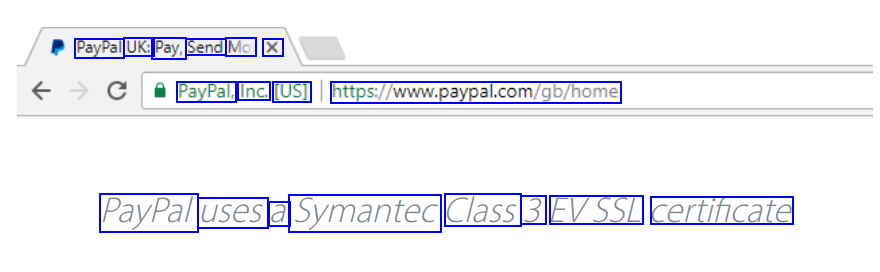
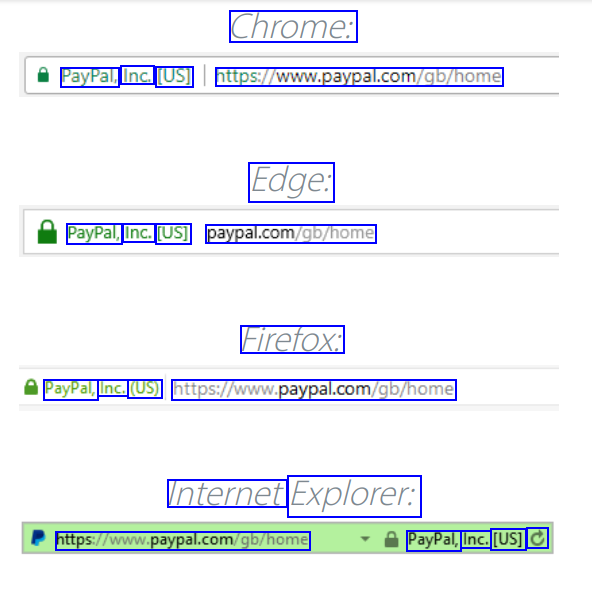
How EV Certificate appears in Browser #
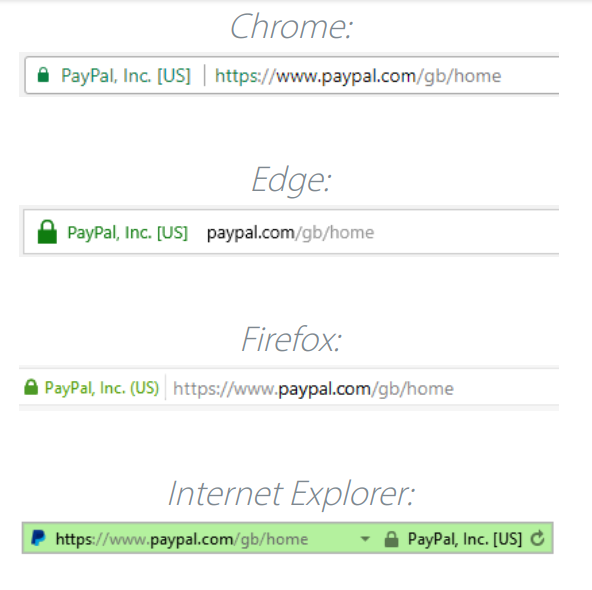
SSL Certificate Verification fc #
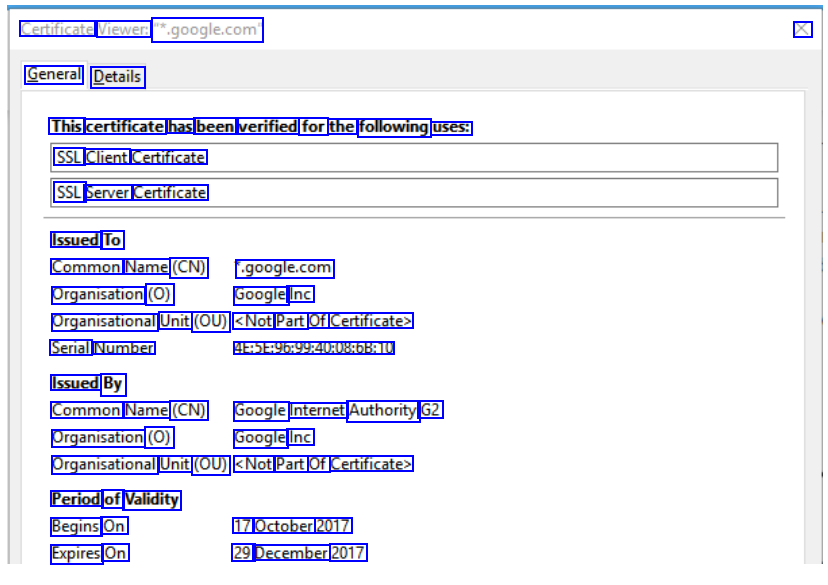
Certificate content #
SSL certificates include:
- The domain name that the certificate was issued for
- Which person, organization, or device it was issued to
- Which certificate authority issued it
- The certificate authority’s digital signature
- Associated subdomains
- Issue date of the certificate
- Expiration date of the certificate
- The public key (the private key is kept secret)*
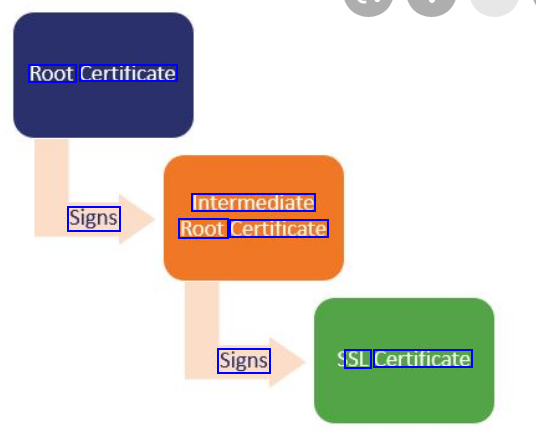
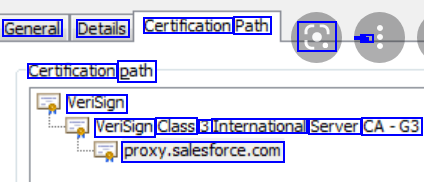
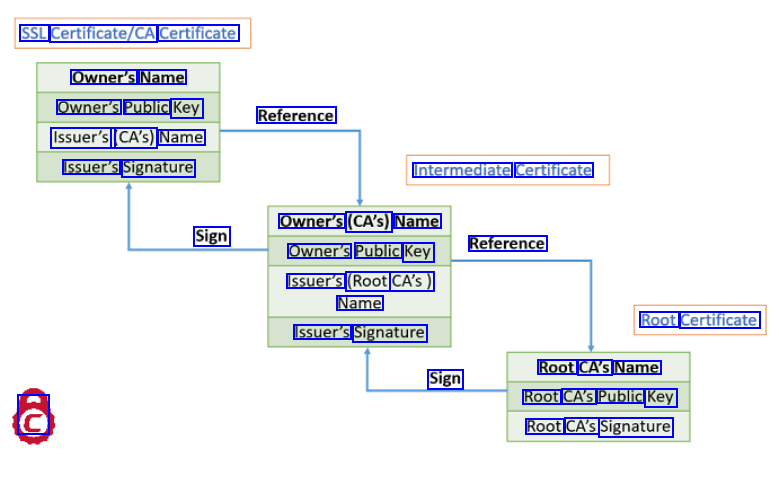
SSL Certificate Chain #
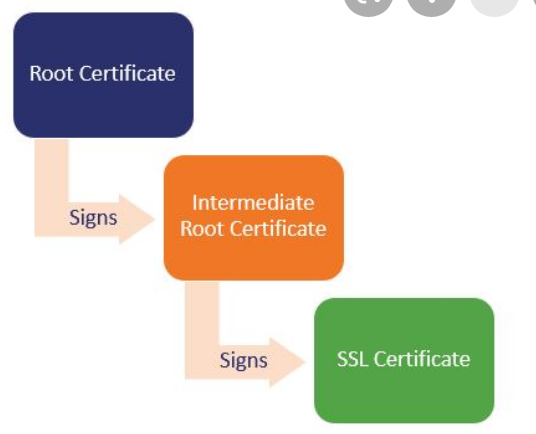
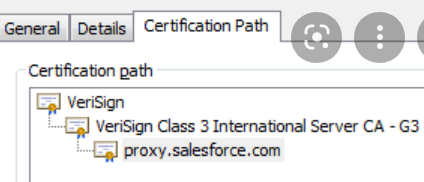
Certificate content and signature #
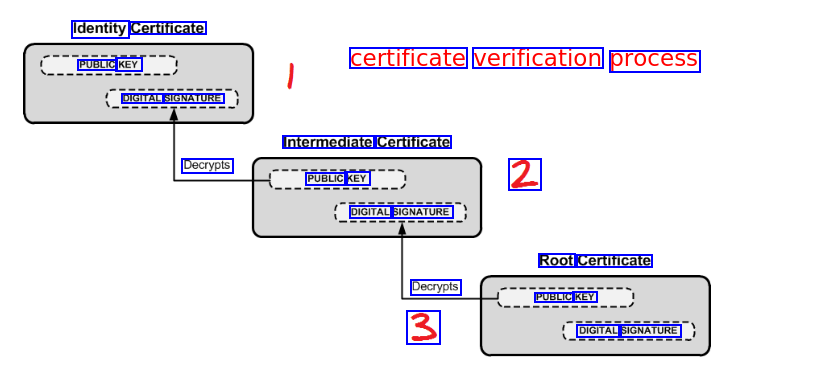
Signing is done with private key
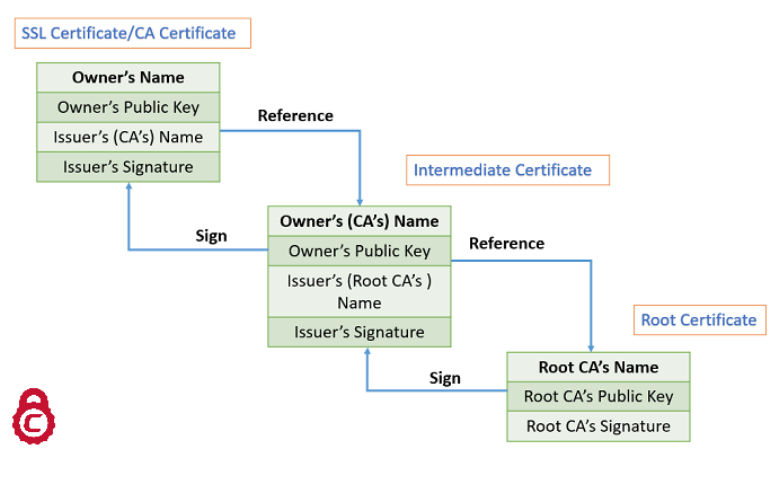
Verification chain #
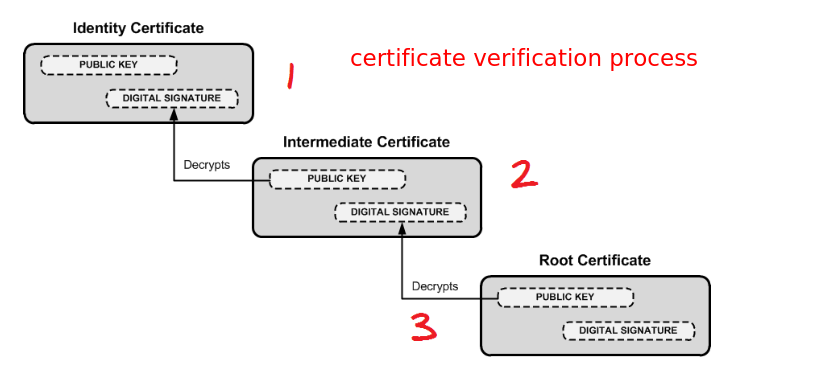
Purchasing #
is good source to purchase cheap SSL ceritificates. I purchased KSAFlyer’s projects’s certificate from here.
Certificates will be emailed by on after purchase #
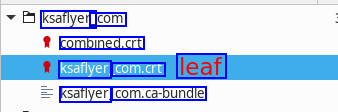
sends certificate zip file that contains both bundle certificate(root + intermediate CA certificates) + leaf certificate.
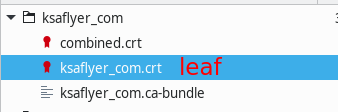
Adding SSL certificate #
To Apache #
<VirtualHost 192.168.0.1:443>
  DocumentRoot /var/www/html2
  ServerName www.yourdomain.com
      SSLEngine on
      SSLCertificateFile /path/to/your_domain_name.crt
      SSLCertificateKeyFile /path/to/your_private.key
      SSLCertificateChainFile /path/to/cabundle.crt # bundle.crt
  </VirtualHost>
To nginx #
Create ssl_certificate #
config details ssl_certificate For the client to recognize the certificate, the complete should be bundled in and `ssl_certificate` should point to the that bundle.
Lesson learned
In KSAFlyer project,
ssl_certificatewas pointing to just root or intermediate CA, this was causing following issues- The ssl certificate on “ksaflyer.com” domain was getting displayed as invalid.
- In the React Native app of the project, the images were not getting rendered because of the SSL issue: Image component was throwing SSL, java, invalidpath? issue. Bundling the SSL certificate as describe in the example below worked
Bundling the SSL certificate
cat your_domain.crt your_domain.ca-bundle >> ssl-bundle.crtserver listen 443; ssl on; #** ssl_certificate /etc/ssl/ssl-bundle.crt; #** ssl_certificate_key /etc/ssl/ssl-tutorials.key;#** server_name ssl-tutorials.com; access_log /var/log/nginx/nginx.vhost.access.log; error_log /var/log/nginx/nginx.vhost.error.log; location / root /var/www/; index index.html;
Debugging SSL issues? #
openssl s_client -connect ksaflyer.com:443 -showcerts
Start Time: 1632912777
Timeout   : 7200 (sec)
Verify return code: 21 (unable to verify the first certificate)
Extended master secret: yes
Tools to verify SSL certificates #
https://www.sslshopper.com/certificate-decoder.html
Glossary #
CA Bundle #
ref CA bundle is a file that contains root and intermediate certificates.
Certificate chain #
The end-entity certificate along with a CA bundle constitutes the certificate chain.
Certificate Authority #
Digital Signature #
ref A digital signature (not to be confused with a digital certificate) is electronic. It can be used with any kind of message, whether it is encrypted or not, so that the receiver can be sure of the sender’s identity and that the message arrived intact.
A digital certificate is an electronic certificate file which contains a digital signature. SSL Certificates are a type of digital certificate. SSL certificates contain the digital signature of the Certificate Authority (CA) that issued it. CAs are companies authorized to create SSL certificates. Browsers can check an SSL certificate’s digital signature to verify that the certificate is real.
Additional benefits to the use of a digital signature are that it is easily transportable, cannot be easily repudiated, cannot be imitated by someone else, and can be automatically time-stamped.
Encryption #
Symmetric Encryption #
Asymmetric or Public-key encryption #
SSL uses a more advanced form of encryption called Public-Key encryption. In Public-key systems, there are two keys: a public key, which anyone may use, and a corresponding private key, which is possessed only by the person who created it – which in this case is the webserver’s administrator. With this method, anyone may send a message encrypted with the owner’s public key, but only the owner has the private key necessary to decrypt it. This allows secure encryption over the Internet. Public-key encryption is a type of encryption called asymmetric encryption because different keys are used for encryption and decryption. Related Asymmetric Cryptography
Root Certificate #
An SSL certificate issued from Certificate Authority (CA). These certificates are distributed to millions of computers so that they can successfully use SSL certificates from those CAs. Devices such as desktops, laptops, smartphones, and printers contain Root Certificates.
SSL Key #
The Private Key is sometimes referred to as the SSL Key. Your server must have a Private Key to function properly and you should always keep it secure and not share it with outside parties. With this key your secure communications can be decrypted. See Private Key for more
SSL Handshake #
The SSL handshake is the term given to the process of the browser and web server setting up an SSL session. The SSL handshake involves the browser receiving the SSL certificate and then sending “challenge” data to the web server in order to cryptographically prove whether the web server holds the SSL key associated with the SSL certificate. If the cryptographic challenge is successful then the SSL handshake has completed and the web server will hold an SSL session with the web browser. During an SSL session the data transmitted between the web server and web browser will be encrypted. The SSL handshake takes only a fraction of a second to complete.
Misc #
Curl vs Python Requests SSL verification Signing is done with private key and data or information is encoded with public key.
OCR of Images #
2023-01-05_19-55-00_screenshot.png #
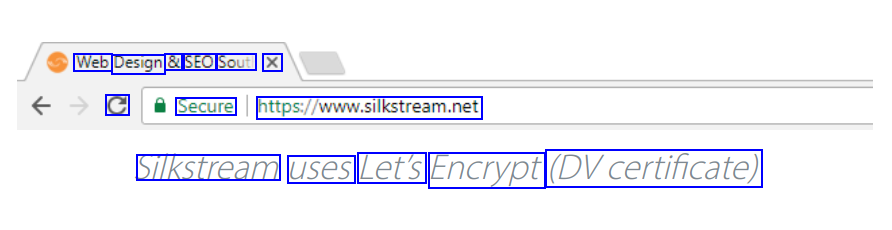
Web Design & SEO Souti X C Secure htps/www.slistream.net Silkstream uses Let's Encrypt (DVcertificate)
2023-01-05_19-56-48_screenshot.png #
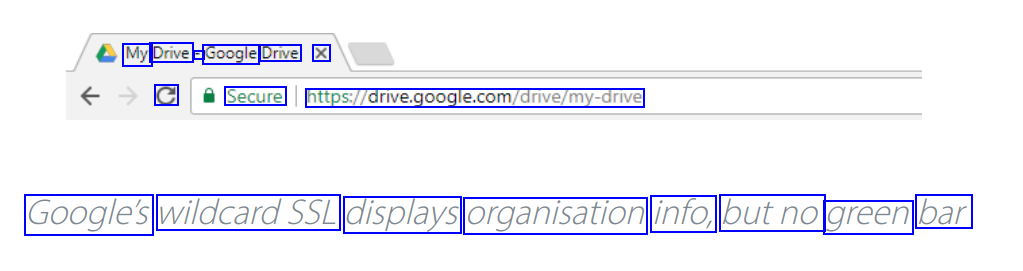
My Drive - Google Drive X C Secure https://drive.google.com/dnive/my-drive Google's wildcardSSL displays organisation info, butno green bar
2023-01-05_19-59-01_screenshot.png #
Certificate Viewer: .google.com" X General Details This certificate has been verified for the following uses: SSL Client Certificate SSL Server Certificate Issued To Common Name (CN) Organisation (O) .google.com Google Inc Organisational Unit (OU) <Not Part Of Certificate> Serial Number Issued By 4E:5E:96:99:40:08:6B:10 Common Name (CN) Google Internet Authority G2 Organisation (O) Google Inc Organisational Unit (OU) <Not Part Of Certificate> Period of Validity Begins On Expires On 17 October 2017 29 December 2017
2023-01-05_19-57-08_screenshot.png #
PayPal UK: Pay, Send Mo X PayPal, Inc. [US] https/www.paypal.com/gb/home PayPal uses a Symantec Class 3 EVSSL certificate
2023-01-05_19-31-11_screenshot.png #
Chrome: PayPal, Inc. [US] https/www.paypal.com/gb/home Edge: PayPal, Inc. [US] paypal.com/gb/home Firefox: PayPal, Inc. (US) https/www.paypal.com/gb/home Internet Explorer: https/www.paypal.com/gb/home PayPal, Inc. [US] C
2021-09-29_14-57-04_screenshot.png #
Root Certificate Intermediate Root Certificate Signs Signs SL Certificate
2021-09-29_15-09-38_screenshot.png #
General Details Certification Path a - - - - - Certification path VeriSign VeriSign Class 3 International Server CA-G3 proxy.salesforce.com
2021-09-29_15-18-33_screenshot.png #
SSL Certificate/CA Certificate Owner's Name Owner's Public Key Issuer's (CA's) Name Reference Issuer's Signature Intermediate Certificate Owner's (CA's) Name Owner's Public Key Issuer's (Root CA's) Sign Reference Name Root Certificate Issuer's Signature Root CA's Name Root CA's Public Key Root CA's Signature Sign @
2021-09-29_15-18-01_screenshot.png #
Identity Certificate PUBLIC KEY certificate verification process DIGITAL SIGNATURE Intermediate Certificate Decrypts PUBLIC KEY 2 DIGITAL SIGNATURE Root Certificate Decrypts PUBLIC KEY 3 DIGITAL SIGNATURE
2021-09-29_14-56-17_screenshot.png #
ksaflyer_ _com combined.crt ksaflyer com.crt leaf ksaflyer com.ca-bundle