ssh
Summary #
The Secure Shell Protocol (SSH) is a cryptographic network protocol for operating network services securely over an unsecured network.[1] Its most notable applications are remote login and command-line execution. ref
Essentials #
ssh the client
sshd the server Daemon
ssh-keygen for generating public/private key pairs
ssh-add and ssh-agent tools for managing authentication keys. ssh-agent daemon caches the decrypted private key. You load your private keys into the agent, and ssh then automatically offers those keys when it connects to new servers, simplifying the process of connecting.
sftp-server the server process for file transfer over SFTP
sftp and scp file transfer client utilities
ssh-agent #
- ssh-agent is a
key manager for SSH. - It holds your keys and certificates in memory, unencrypted, and ready for use by ssh.
- It saves
you from typing a passphrase every time you connect to a server. It runs in the background on your system, separately from ssh, and it usually starts up the first time you run ssh after a reboot.
The SSH agent keeps private keys safe because of what it doesn’t do:
- It doesn’t write any key material to disk.
- It doesn’t allow your private keys to be exported.
- Private keys stored in the agent can only be used for one purpose: signing a message.
But if the agent can only sign messages, how does SSH encrypt and decrypt traffic? #
When first learning about public and private SSH keys, it’s natural to assume that SSH uses these key pairs to encrypt and decrypt traffic. That’s what I thought. But it’s not the case. An SSH key pair is only used for authentication during the initial handshake.
For example, here’s how a user’s key is verified during the SSH handshake, from the server’s perspective:
- The client presents a public key to the server.
- The server generates and sends a brief, random message, asking the client to sign it using the private key.
The client asks the SSH agent to sign the message and forwards the result back to the server.- The server checks the signature using the client’s public key.
- The server now has proof that the client is in possession of their private key.
- Later in the handshake process, a set of new, ephemeral and symmetric keys are generated and used to encrypt the SSH session traffic. These keys may not even last the entire session; a “rekey” event happens at regular intervals.
Why SSH passphrase #
ref SSH uses private/public key pairs to protect your communication with the server. SSH passphrases protect your private key from being used by someone who doesn’t know the passphrase. Without a passphrase, anyone who gains access to your computer has the potential to copy your private key. For example, family members, coworkers, system administrators, and hostile actors could gain access.
ssh-agent forwarding #
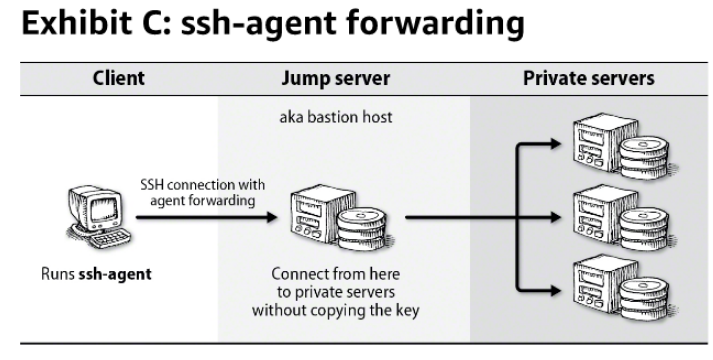 They cannot read your private keys directly, but they can use any that are available through the
agent forwarding.
They cannot read your private keys directly, but they can use any that are available through the
agent forwarding.
host aliases #
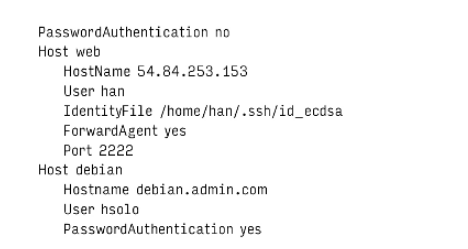
Connection multiplexing #
Improves performances over WAN. When enabled, the first connection to a host creates a Socket that can be reused. Subsequent connections share the Socket but requires separate authentication.
Known_hosts #
while connecting to server with ssh, the server sends back the public key for verification. If the server isn’t already known and trusted , ssh prompts the user to confirm the server by presenting a hash of the server’s public key called key fingerprint:

The intent is that the server administrator can communicate the host key to users in advance. Users can then compare the information they received from the administrator to the server’s proffered fingerprint when they first connect. If the two match, the host’s identity is proved.
~/.ssh/known_hosts
Commonly used commands #
To run a command on remote server #
ssh apps-3.test.kfupm.edu.sa "df ~"
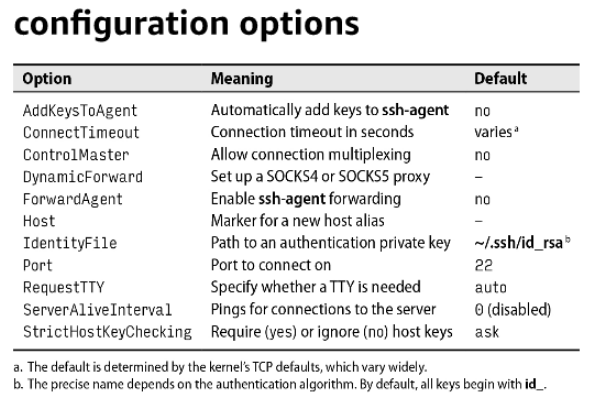
ssh_config #
ssh reads configuration settings from the site-wide file “etc/ssh/ssh_config” and process additional
options and override on a per-user basis from /.ssh/config.
Public key authentication #
Public key is given to the server administrator, who adds it to the server in the file “~/.ssh/authorized_keys”. You can login onto the remote server by running ssh with remote username and matching private key.
Port forwarding #
To access not exposed port on server through ssh tunneling.
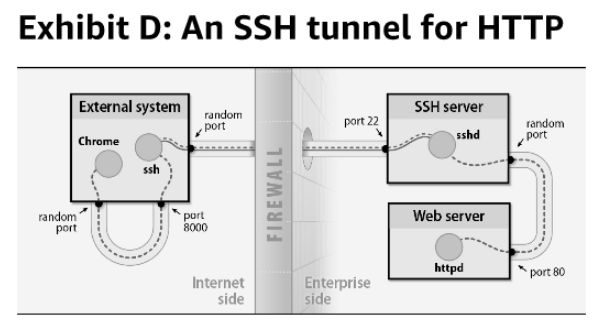

port 80 of the server will be accessible as 8000 on local machine, through SSH tunnel.
ssh-keyscan #
# command to generate host has with public key for host key verfication
ssh-keyscan -H -t ed25519 courses-1.kfupm.edu.sa
# this will be added to /etc/ssh/ssh_known_hosts