sentry
- tags
- Observability
Summary #
URL github Developer-first error tracking and performance monitoring (APM)


Installation requirements #
Going to Production #
We strongly recommend using a dedicated load balancer in front of your Sentry setup bound to a dedicated domain or subdomain. A dedicated load balancer that does SSL/TLS termination that also forwards the client IP address as Docker Compose internal network (as this is close to impossible to get otherwise) would give you the best Sentry experience. As part of this setup we recommend configuring a load balancer health check against the _health endpoint using HTTP protocol. This will return a 200 if Sentry is up or a 500 with the list of problems.
Once you have setup a load balancer or reverse proxy to your Sentry instance, you should modify the system.url-prefix in the config.yml file to match your new URL and protocol. You should also update the SSL/TLS section in the sentry/sentry.conf.py script, otherwise you may get CSRF-related errors when performing certain actions such as configuring integrations.
- Keep in mind that all this setup uses single-nodes for all services, including Kafka.
- For larger loads, you’d need a beefy machine with lots of RAM and disk storage. To scale up even further, you are very likely to use clusters with a more complex tool, such as Kubernetes. Due to self-hosted installations’ very custom nature, we do not offer any recommendations or guidance around scaling up.
- We do what works for us for our thousands of customers over at sentry.io and would love to have you over when you feel your local install’s maintenance becomes a burden instead of a joy.
Issues Faced #
CSRF verification failed #
CSRF_TRUSTED_ORIGINS = ["https://sentry.example.com", "http://10.100.10.10", "http://127.0.0.1:9000"]
after changing config files, run ./install.sh command
404 not found api/0/issues/1/events/latest/ #
#  ansible_managed

# copied from sample configurations here
# https://github.com/getsentry/self-hosted/blob/67f70915b59c0af3a03d324138f276484f04b275/nginx/nginx.conf
log_format main '$remote_addr - $remote_user [$time_local] "$request" '
'$status $body_bytes_sent "$http_referer" '
'"$http_user_agent" "$http_x_forwarded_for"';

access_log /var/log/nginx/access.log main;

# sendfile on;
# tcp_nopush on;
tcp_nodelay on;
reset_timedout_connection on;

keepalive_timeout 75s;

server_tokens off;

server_names_hash_bucket_size 64;
# types_hash_max_size 2048;
# types_hash_bucket_size 64;
# client_body_buffer_size 64k;
# client_max_body_size 100m;

proxy_http_version 1.1;
proxy_redirect off;
proxy_buffer_size          128k;
proxy_buffers              4 256k;
proxy_busy_buffers_size    256k;
proxy_next_upstream error timeout invalid_header http_502 http_503 non_idempotent;
proxy_next_upstream_tries 2;

# Docker default address pools
# https://github.com/moby/libnetwork/blob/3797618f9a38372e8107d8c06f6ae199e1133ae8/ipamutils/utils.go#L10-L22
set_real_ip_from 172.17.0.0/16;
set_real_ip_from 172.18.0.0/16;
set_real_ip_from 172.19.0.0/16;
set_real_ip_from 172.20.0.0/14;
set_real_ip_from 172.24.0.0/14;
set_real_ip_from 172.28.0.0/14;
set_real_ip_from 192.168.0.0/16;
set_real_ip_from 10.0.0.0/8;
real_ip_header X-Forwarded-For;
real_ip_recursive on;

# Remove the Connection header if the client sends it,
# it could be "close" to close a keepalive connection
proxy_set_header Connection '';
proxy_set_header Host $host;
proxy_set_header X-Forwarded-For $remote_addr;
proxy_set_header X-Forwarded-Proto $scheme;
proxy_set_header X-Request-Id $request_id;
proxy_read_timeout 30s;
proxy_send_timeout 5s;


upstream sentry
     server localhost:9000;


upstream relay
    server localhost:9000; # this fixed that nasty 404 error


server
    listen 80;

    location /
        proxy_pass http://sentry;


        location /api/store/
                        proxy_pass http://relay;


    location ~ ^/api/[1-9]\d*/
                        proxy_pass http://relay;


# todo ssl certs
Observation #
Cause of this issue was I assumed that services running at port 3000[relay] and 9000[sentry] are the ports mapped from containers to host, but it turned out that nginx container is mapped to 9000 of host and it is redirecting the requests to container.
Implemented architecture is
nginx -> nginx (container at port 9000) -> application
Replay #
Setting up Email to send the notifications #
gmail #
sentry.conf.py Comment Mail settings
########
# Mail #
########

# SENTRY_OPTIONS["mail.list-namespace"] = env("SENTRY_MAIL_HOST", "localhost")
# SENTRY_OPTIONS["mail.from"] = f"sentry@SENTRY_OPTIONS['mail.list-namespace']"
config.yaml
mail.backend: 'smtp' # Use dummy if you want to disable email entirely
mail.host: 'smtp.gmail.com'
# mail.port: 587 # tls
mail.port: 465 # ssl
mail.username: 'sentry9.khan@gmail.com'
mail.password: 'app-passowrd-wo-spaces'
mail.use-ssl: true
mail.from: 'sentry9.khan@gmail.com'
Custom Instrumentation #
Installing Github integration on self-hosted #
- Create a Github app
ref
create privatekey in github app
Add Sentry settings ref
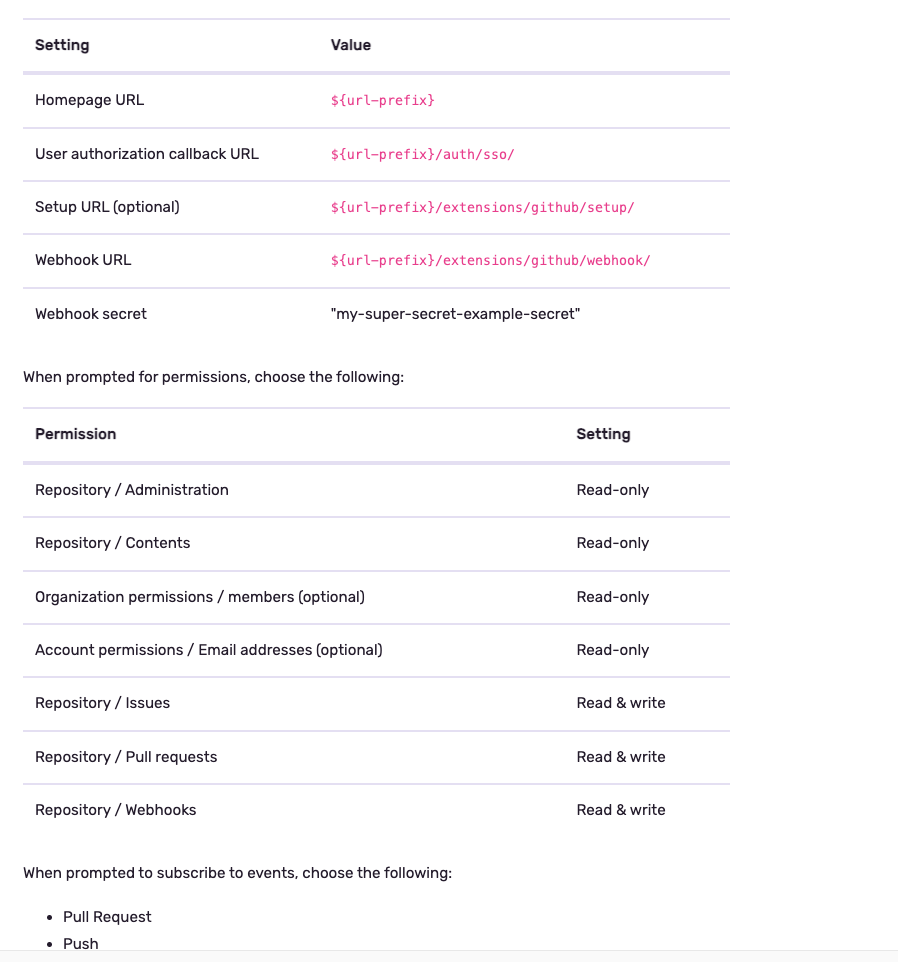
Note: callback_url from the settings mentioned did not work.
callback_url = $url-prefix/extensions/github/setup/ worked!
it is mentioned correctly here
try re-installing when trying “add installation” does not work #
- un-install the app from github
- try adding again ref
Basics #
Events #
An event is one instance of you sending us data. Generally, this is an error, but it’s possible to send us non-error related data as well. ref
Details #
The most important difference between your general logging infrastructure and Sentry is how events are stored. Logging is very much intended to capture the entirety of your data, and give you maximum auditability. Systems like Sentry lose a lot of data when computing rollups and transformations. For example, Sentry won’t store the full details of every error that comes in if it’s one that already exists. This effectively means that Sentry doesn’t make guarantees of allowing you to find an exact historical error. Because of this, it’s important that in cases where you do need to be able to trace events you maintain them in your existing logging infrastructure.
Another important differentiator between Sentry and generic logging is the amount of context captured. This context is extremely valuable when debugging an issue, but matters a lot less in many situations where you’d use traditional logging. This is important because of the large cost associated with storing that context. It’s simply something that you generally wouldn’t want to pay for for all logging, but is absolutely critical for crash analysis. ref
Sendings logs as events with python #
logging.basicConfig(level=logging.INFO)

sentry_sdk.init(
    # ...
    integrations=[
        LoggingIntegration(
            level=logging.INFO,        # Capture info and above as breadcrumbs
            event_level=logging.INFO   # Send records as events
        ),
    ],
)
With this config logs will be sent as events
Where to check these events in Sentry UI #
One of the places is see events is Explore
-> Discover
-> Dashboard
-> Issues
-> Alerts
ref
OCR of Images #
2024-06-09_00-42-36_screenshot.png #

100,000+ GROWING TEAMS USE SENTRYTO FIND PROBLEMS FAST GitHub DisNEp 1 ATLASSIAN PELOTON vmware Airtable SONOS # slack reddit AAUTODESK Microsoft CLOUDFLARE i instacart all. CISCO Meraki flexport. TONAL miro dl. monday com
2024-06-09_00-44-09_screenshot.png #

Numbers That Make Us Look Good Loved 4M by 100K developers and across 146 organizations countries 790B spanning continents with events processed monthly (We're still waiting on our first customer in Antarctica) and $217M raised in - rounds of funding (That's enough to build the Golden Gate Bridge six times, if we could take that money and time travel back to 1933)
2024-06-22_17-21-58_screenshot.png #
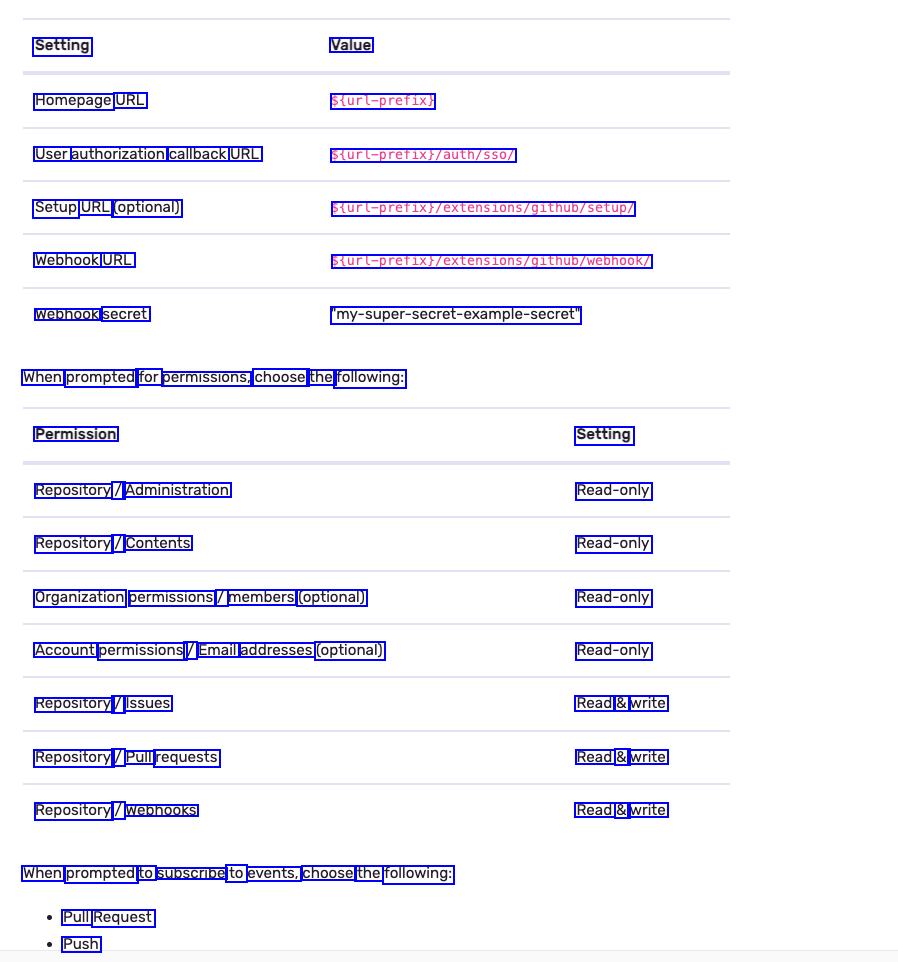
Setting Value Homepage URL Sturl-prefix) User authorization callback URL Setup URL (optional) Webhook URL Webhook secret Sturl-prefixy/auth/sso/ Sturl-prefixi/extensions/g1thub/Setup/ Sturl-pretix;/extens1ons/g1thub/webhook/ my-super-secret-example-secret When prompted for permissions, choose the following: Permission Setting Read-only Read-only Read-only Read-only Read & write Read & write Read & write Repository / Administration Repository / Contents Organization permissions / members (optional) Account permissions / Email addresses (optional) Repository / Issues Repository / Pull requests Repository / Webhooks When prompted to subscribe to events, choose the following: Pull Request Push