Org Agenda
- tags
- Org Mode
Planning and Creating Tasks #
Workflow #
Example #
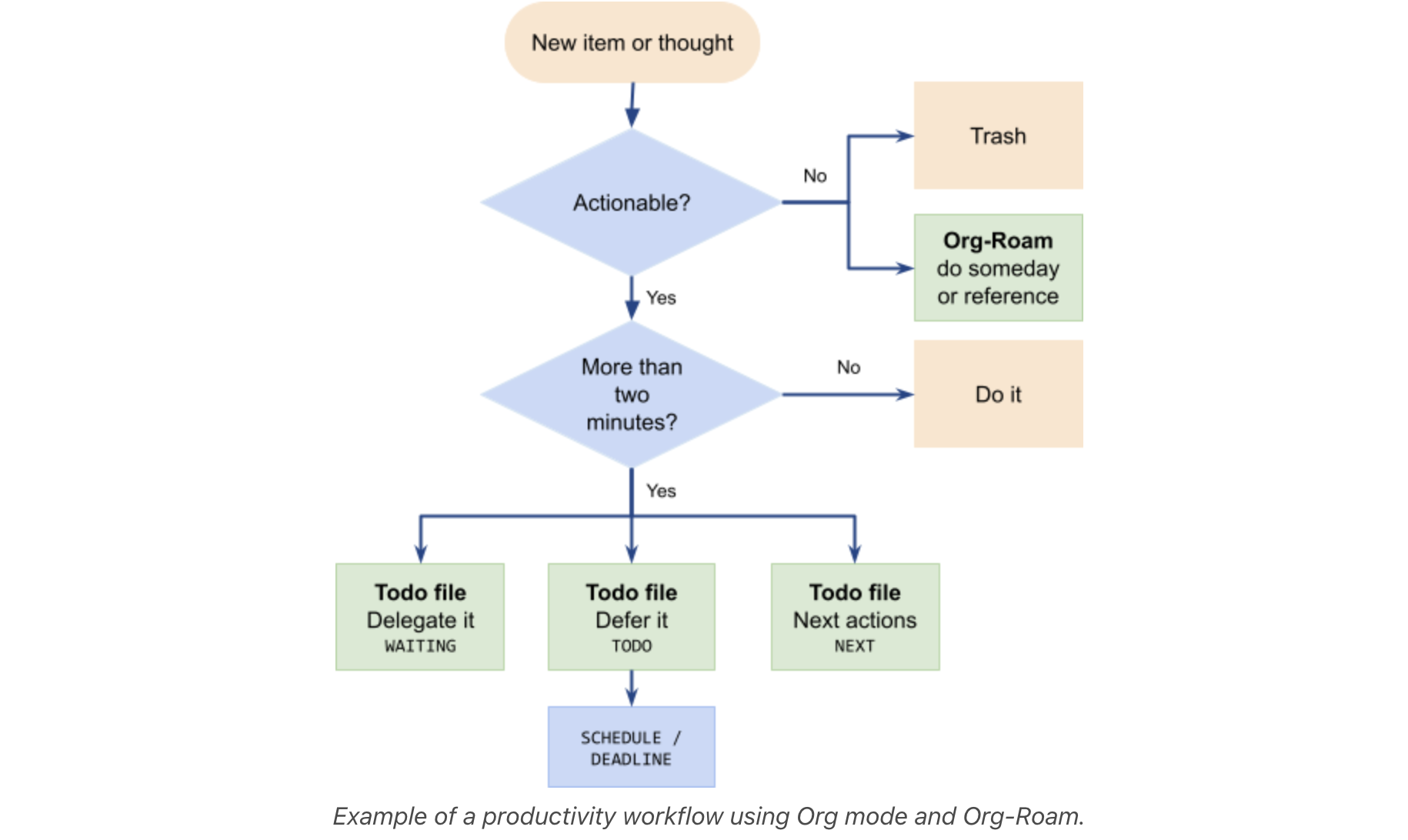
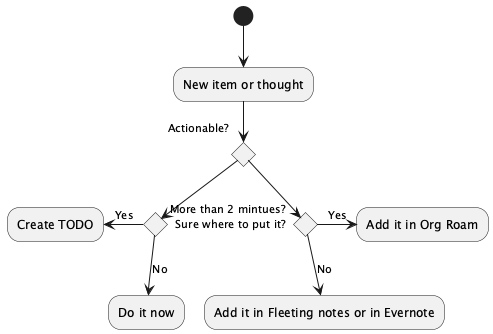
My modified workflow from example #
Plan next day’s 3 tasks #
which is to take some time at the end of the day to pick the three things you will do the following day.
ref Somewhere suggested by Tim Ferris as well.
How to prioritize? #
Priority A should be completed today #
Types of tasks #
I classify all of my activities into one of four buckets:
- Things I need to do, eventually;
- Things I need to complete by a specific date;
- Things I cannot (or won’t) start until a specific date; and
- Things I should do with some loose frequency.
Each of these use cases aligns with an Org Mode feature, and those features are, respectively:
- A plain TODO entry,
- An entry with a DEADLINE time stamp,
- An entry with a SCHEDULED time stamp, and
- An entry with a STYLE property of “habit.”
Agenda CS #
Emacs Mode #
prefix command org clock and agenda
C-c C-x
- C-c ,: Set priority
Evil Mode #
- I -> clock in
C-c C-x C-i - O -> clock out
C-c C-x C-o - t -> cycle through todo
- a -> add notes
- gr, gR -> refresh agenda and all agendas
- da, dA -> archive
- dd -> delete item
- cT -> set timer
C-c C-x ; - Pause/resume timer
C-c C-x ,0:16:18 - Insert time stamp
C-c C-x . - C-c C-x e -> effort C-c C-x C-e
- ct -> set tag
- cg -> jump to currently clocked in task
- sc, sr, se, st, s^: search/filter
- s r -> regex search of TODO tasks s r to reset the search
- C -> capture k -> when on tags
- q -> quit
- A -> append to agenda
- J,K -> up down priority
Habits or Repeating tasks #
A SCHEDULED tag with a repeat specification (like .+ or ++), and #
A STYLE property set to the value habit. #
“+1d” is the repeater: it repeats the task or every day
and it should have a property of style with value “habit”
org-set-property C-c C-x p value “habit”
Repeater #
- The TODO has a scheduled date, usually with a ‘.+’ style repeat interval.
- A ‘++’ style may be appropriate for habits with time constraints, e.g., must be done on weekends,
- or a ‘+’ style for an unusual habit that can have a backlog, e.g., weekly reports.
don’t use plain “+” for habit #
You can use a plain + repeat, which is unusual for a habit, because if you fall quite behind you will need to complete the task as many times as it takes for the next occurrence to get into the future.
When it can be used?
This would be useful for something like paying your rent where you cannot skip any instances, but that isn’t really a habit, now is it?
.+ vs ++ #
.+1d : advance 1 day after completion ++1w: like .+1w but respects the scheduled time
SCHEDULED: <2022-01-09 Sun ++1w>
If you use + instead of . it means “from the last date completed, count as many 2-day intervals as necessary to find a date in the future.” This is useful if you want something to always fall on the same days of the week, for example.
Example #
‘.+2d/3d: (minimum/maximum ) which says that you want to do the task at least every three days, but at most every two days.
Example #
org-habit-plus #
As simple as specifying the weekdays (1 = Monday, 7 = Sunday, space separated), on which a habit is expected to be performed, in the :HABIT_WEEKDAYS: property.
WARNING!!! Expect consistent behaviour only for “.+”-style habits. The “+”- and “++”-style habits are better, at least for now, to be used the original way.
Timer #
Relative Timer #
Count up Timer Insert time stamp:
C-c C-x .C-c C-x -as item in a list
Where to use them? #
Any where when notes and associated chronological time is important. Examples:
- Meeting Notes
- Video Notes
- Lecture or Course notes
Command #
- Set time ->
C-c C-x 0 - Pause timer ->
C-c C-x , - Stop timer ->
C-c C-x _
Count Down Timer #
Examples use cases:
- Brainstorming
- TO create pressure for completing task on time
Command #
- Set time ->
C-c C-x ; - Pause timer ->
C-c C-x , - Stop timer ->
C-c C-x _
Good references I followed #
https://blog.aaronbieber.com/2016/09/25/agenda-interactions-primer.html
Scheduling #
Relative #
+1h= 1 hour from now+1d= 1 day from now+1m= 1 minute from now
Absolute #
- 11am
Doom Emacs #
“\” Switching to Emacs state for the next command
- \ /
- select from available tags to filter agenda view