oci-cli
tags :
CLI for Oracle and Oracle Cloud Infrastructure #
installation Oracle Cloud Infrastructure instead of using OCI (web)console, the resources can be controlled from CLI
brew update && brew install oci-cli
oci --version
Cloud Shell to access Kubernetes from web based terminal #
CloudShell provides a collection of pre-installed and pre-authenticated tools readily accessible to users which are updated on a regular basis including:
- OCI Command Line Interface (CLI)
- Source Code Management: git
- SQL: SQLcl, mysql-community-client
- Kubernetes utilities: kubectl, helm
- Build tools: maven, make
- Provisioning and configuration management: terraform, ansible
- Editors: vim, nano, Emacs
- Linux Shells: bash, sh(Shell), tmux
- Linux utilities: iputils, jq, wget, zip/unzip, tar (and many more)
- Python tools: pip, iPython
- TypeScript/JavaScript support: node.js, NPM, nvm
- Docker: Docker engine
Hit return to continue, r to replay, b to go back, q to quit:
OCI-CLI #
Using the OCI Command Line Interface (CLI)
Included in Cloud Shell is a current version of the OCI CLI. The CLI is a small-footprint tool that you can use on its own or with the Console to complete Oracle Cloud Infrastructure tasks. The CLI provides the same core functionality as the Console, plus additional commands. Some of these, such as the ability to write and run scripts, extend Console functionality.
Cloud Shell updates the version of the OCI CLI on a regular basis. This means you are always using the latest version of our tools. We also automatically configure your credentials when you launch Cloud Shell so no further setup is required to use the OCI CLI in Cloud Shell. Authentication happens automatically.
Hit return to run the oci command oci iam availability-domain list :
oci iam availability-domain list
interactive mode #
Type oci -i to go into interactive mode: youtube tutorial
command suggestion and autocompletion #
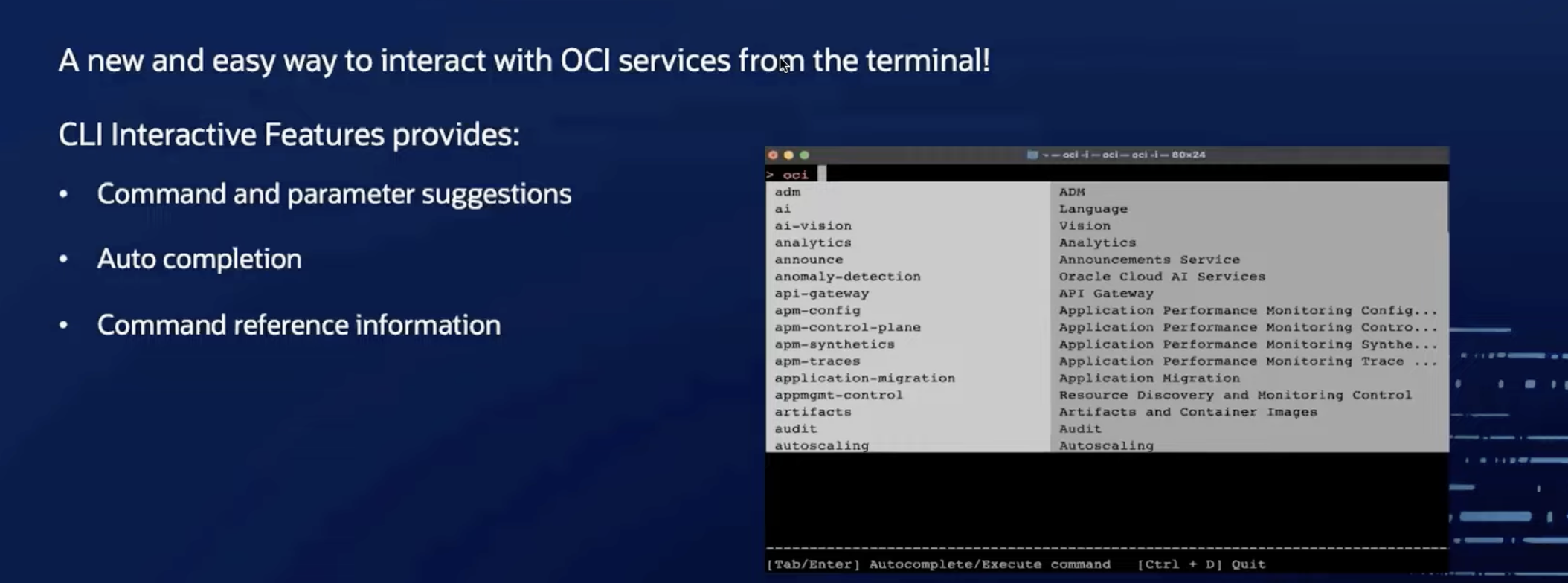
autocompletions #
- use space or tab or enter
- in interactive mode, user gets help about commands and parameters