DNS
DNS #
Domain Name System Online DNS tools or services Service to all DNS records or Resource records
- In Domain Name System(DNS), TCP/IP protocol uses the IP address that uniquely identifies a host’s connection to the Internet to identify an entity.
- DNS is a hierarchical system based on a distributed Database that uses a hierarchy of =Name Servers to resolve Internet host names into the corresponding IP addresses required for packet routing by issuing a DNS query to a name server.
DNS in the Internet: DNS is a protocol that can be used on different platforms.
Domain name space is divided into three categories. #
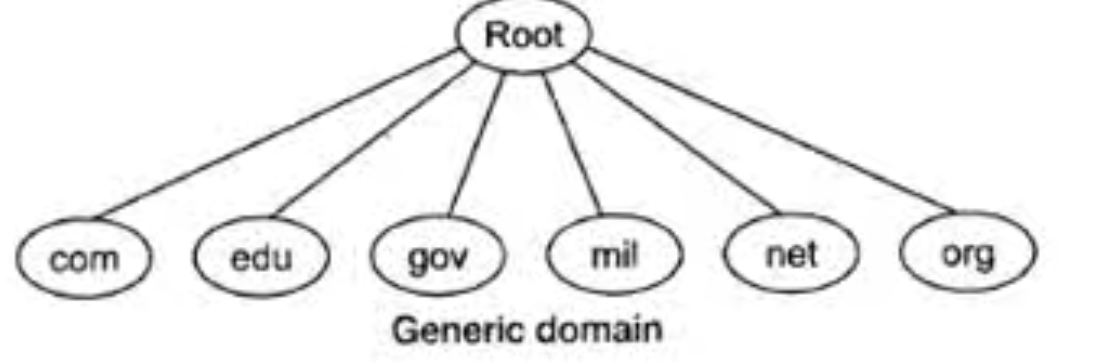
Generic Domain #
The generic domain defines registered hosts according to their generic behavior. Each node in the tree defines a domain which is an index to the domain name space database.
Country Domain #
The country domain section follows the same format as the generic domain but uses 2 characters of country abbreviations (e.g., the US for the United States) instead of 3 characters.
Inverse Domain #
The inverse domain maps an address to a name.
Resource records #
source
The Domain Name System specifies a database of information elements for network resources. The types of information elements are categorized and organized with a list of DNS record types, the resource records (RRs)=.
Resource records are the basic information element of the Domain Name System (DNS).
JAK simplified #
DNS is database of network resources organized or categorized as record types or resource records
Important resource records #
A records #
An A record maps an IPv4 address to a domain name. This determines where to direct any requests for a domain name. DO ref
The “A” in A record stands for “address”, which is what you use to point a domain apex. When it comes to a Domain Name System (DNS), an A record is one of the most fundamental types of DNS records as it points to the IP address of a specific domain. If you were to lookup the A record of newgreatbrand.com, the A record would return a specific IP address and should only show an IPv4 address. A records can map domain names to one or many IP addresses directly. easydir ref
Adding a subdomain using A record
AAA records #
The AAAA record is conceptually similar to the A record, but it allows you to specify the IPv6 address of the server, rather than the IPv4. ref
MX records #
A mail exchanger record (MX record) specifies the mail server responsible for accepting email messages on behalf of a domain name. It is a resource record in the Domain Name System (DNS). It is possible to configure several MX records, typically pointing to an array of mail servers for load balancing and redundancy. wiki source
MX lookup
CNAME records #
Canonical Name records (CNAME record) are used for all other types of domains that are not domain apexes. Used for Sub domains to point them to a different domain.
CNAMEs map a domain name to another domain name rather than an IP address making them more flexible.
They are preferred by technical people because they are more reliable and easier to scale versus an A record.Whenever possible, EasyRedir will direct you to use a CNAME record rather than an A record, as a CNAME record allows us to dynamically return different IP addresses on your behalf. This means you get the best possible speed, reliability and security. Though this may vary on a case by case basis.
CNAME lookup
Adding a subdomain using CNAME (more flexible)
TXT records #
A TXT record is used to associate a string of text with a hostname. These are primarily used to verify that you own a domain.
Nameserver #
A nameserver is a server in the DNS that translates domain names into IP addresses. Nameservers store and organize DNS records, each of which pairs a domain with one or more IP addresses. These servers act as the bridge between domain names, which we humans can remember, with IP addresses, which computers can process. ref
NS lookup (Nameserver lookup)
TTL #
TTL is time to live, for how long the DNS information will be cached client-side. After this period of time, it will be re-requested by the client.
ref, ref2
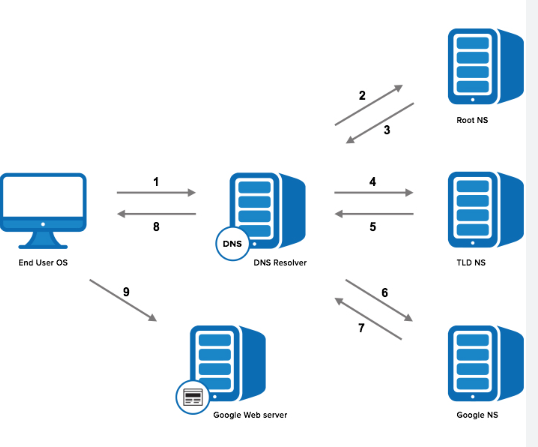
Steps in DNS resolution #
- DNS server finds the Nameserver responsible for resolving the domain to an IP
- Nameserver then finds the IP associated with the DNS from the database Nameserver will specific to the Cloud service providers like DO or AWS or Azure or domain registrar like GoDaddy
- Nameserver returns IP address to the browser
Definitions #
Domain Apex #
A domain apex is the root of a registrable domain and does not contain a subdomain part. Apex domains are also often referred to as base domains, bare domains, naked domains, root apex domains, or zone apex domains but these are all relatively interchangeable in descriptions.
List of all resource records #
OCR of Images #
2023-01-05_18-10-32_screenshot.png #
Root com edu gov mil net org Generic domain
2022-12-29_11-18-49_screenshot.png #
- 2 Root NS 3 1 - - - - 8 5 - DNS End User OS DNS Resolver TLD NS 9 6 7 - Google Web server Google NS