django-storage
A Django package to store static and media files in Object Storage #
django-storages is a project to provide a variety of storage backends in a single library.
readme docs #
Compatible with #
- Amazon S3
- Apache Libcloud
- Azure Storage
- Backblaze B2
- Digital Ocean
- Dropbox
- FTP
- Google Cloud Storage
- Oracle Cloud (Object Storage in OCI) https://django-storages.readthedocs.io/en/latest/backends/oracle-cloud.html
- SFTP
Testing #
DO Spaces Spaces #
working configs in a project: file:~/Code/personal/cmss/bakerydemo/bakerydemo
Django settings #
from django.core.files.storage import default_storage
default_storage.exists('storage_test')
False
file = default_storage.open('storage_test', 'w')
file.write('storage contents')
file.close()

default_storage.exists('storage_test')
True
file = default_storage.open('storage_test', 'r')
file.read()
'storage contents'
file.close()

default_storage.delete('storage_test')
default_storage.exists('storage_test')
False
Django settings
# Digitalocean cloud using AWS S3 protocol
if USE_SPACES is True:
    print("using spaces")
    INSTALLED_APPS.append("storages")
    # AWS_DEFAULT_ACL = 'public-read'
    AWS_DEFAULT_ACL = None # to not make everything public-read by default

    AWS_ACCESS_KEY_ID = os.getenv('AWS_ACCESS_KEY_ID')
    AWS_SECRET_ACCESS_KEY = os.getenv('AWS_SECRET_ACCESS_KEY')
    AWS_STORAGE_BUCKET_NAME = os.getenv('AWS_STORAGE_BUCKET_NAME')
    AWS_S3_ENDPOINT_URL = os.getenv('AWS_S3_ENDPOINT_URL')
    AWS_S3_OBJECT_PARAMETERS = 'CacheControl': 'max-age=86400'

    MEDIA_URL = f'AWS_S3_ENDPOINT_URL/AWS_PUBLIC_MEDIA_LOCATION/'
    DEFAULT_FILE_STORAGE = 'bakerydemo.storage_backends.PublicMediaStorage'

    # static settings
    # AWS_LOCATION = 'static'
    # STATIC_URL = f'AWS_S3_ENDPOINT_URL/AWS_LOCATION/'
    # STATICFILES_STORAGE = 'storages.storage_backends.s3boto3.S3Boto3Storage'
    # STATICFILES_STORAGE = 'bakerydemo.storage_backends.StaticStorage'
else:
    print("not using spaces")
storage backend configs “storage_backends.py” #
from django.conf import settings
from storages.backends.s3boto3 import S3Boto3Storage


class PublicMediaStorage(S3Boto3Storage):
    location = settings.AWS_PUBLIC_MEDIA_LOCATION
    default_acl = 'public-read'
    file_overwrite = False


class StaticStorage(S3Boto3Storage):
    location = settings.AWS_STATIC_LOCATION


class PrivateMediaStorage(S3Boto3Storage):
    location = settings.AWS_PRIVATE_MEDIA_LOCATION
    default_acl = 'private'
    file_overwrite = False
    custom_domain = False
env variables #
# DJANGO_SETTINGS_MODULE = bakerydemo.settings.production
# DJANGO_DEBUG = off # on # default is off
DEVELOPMENT_MODE = on # off # default is off

# Digitalocean spaces
USE_SPACES = on # off # default is off
AWS_STORAGE_BUCKET_NAME = ""
AWS_ACCESS_KEY_ID = ""
AWS_SECRET_ACCESS_KEY = ""
AWS_S3_ENDPOINT_URL = "https://"

# database
DATABASE_URL = "sqlite://./db.sqlite3"
Experience with it #
Used in Wagtail and Django projects to store the media and static files in the object storage services like S3 and spaces
Storing files from Django app to Object Storage in OCI #
create policy to access the object storage
credentials to access the object storage #
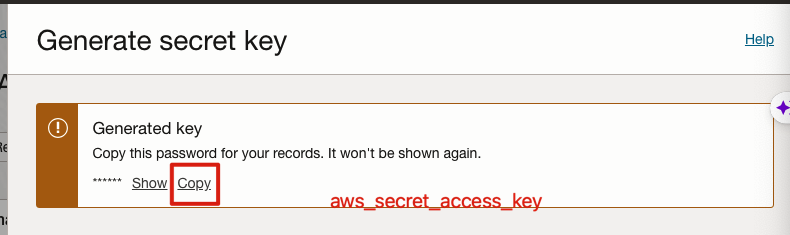
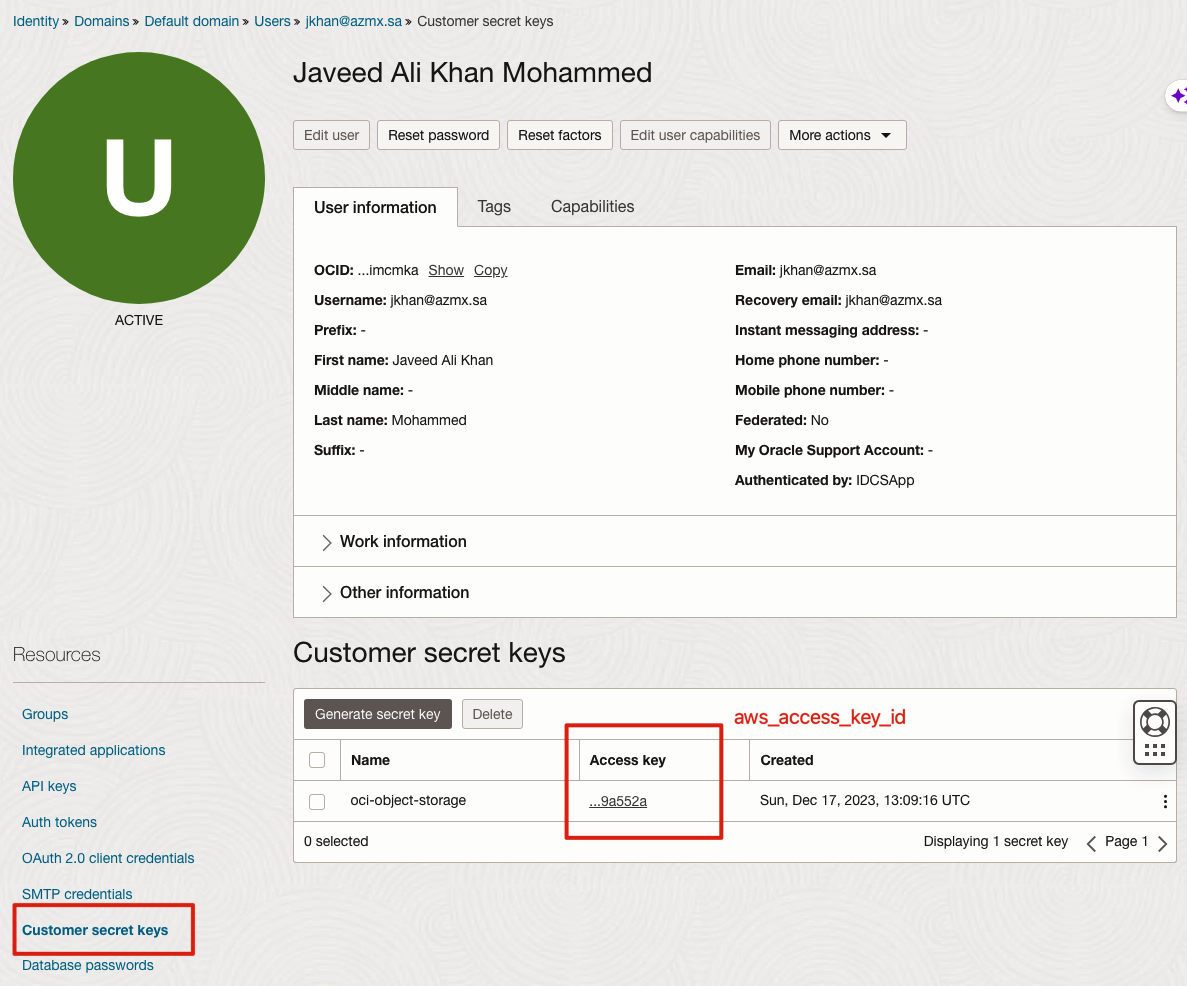
Important Note : This code is a simple ListBucket and PutObject operation to OCI using Amazon Python SDK. Please note not all S3 API operations are supported. For all supported S3 operations refer : https://docs.oracle.com/en-us/iaas/Content/Object/Tasks/s3compatibleapi.htm aws_secret_access_key is the Secret key of OCI displayed in Section 1.B
aws_access_key_id is the Access Key of OCI displayed in Section 1.C endpoint_url is in format https://<OCI-Tenancy-Namespace>.compat.objectstorage.<OCI-Region>.oraclecloud.com eg: https://ocicpm.compat.objectstorage.ap-sydney-1.oraclecloud.com In newer OCI tenancies the tenancy namespace is a random string instead of a proper noun. Ref : https://docs.oracle.com/en-us/iaas/Content/Object/Tasks/understandingnamespaces.htm
Sample Python to upload files #
python3 -m venv ~/.envs/invoice-env
(pyvenv-activate "~/.envs/invoice-env")
which python
import boto3

# Replace these values with your actual details
aws_access_key_id = 'e026f160ea1a8ee69adaaeee18c2f0ba909a552a' # after secret key is created, it is referred with this id
aws_secret_access_key = 'GuRNjWGn177fdbtbBapVDnsNc2LMoTs0Ay95TRJmV3Y=' # secret key that will displayed
# aws_secret_access_key = 'oci-object-storage'
region_name = 'me-jeddah-1'  # Replace with your OCI region
endpoint_url = 'https://axlywjsa8odp.compat.objectstorage.me-jeddah-1.oraclecloud.com'  # Replace with your endpoint URL

# Create a Boto3 session
s3 = boto3.client(
    's3',
    region_name=region_name,
    aws_access_key_id=aws_access_key_id,
    aws_secret_access_key=aws_secret_access_key,
    endpoint_url=endpoint_url
)

# List all buckets in OCI Object Storage
def list_buckets():
    try:
        response = s3.list_buckets()
        for bucket in response.get('Buckets', []):
            print(f'Bucket Name: {bucket["Name"]}')
    except Exception as e:
        print(f'Error: {e}')

list_buckets()
Sample Django settings #
```requirements.txt django-storages[s3] ````
AWS_ACCESS_KEY_ID = os.environ.get("ORACLE_CUSTOMER_ACCESS_KEY")
AWS_SECRET_ACCESS_KEY = os.environ.get("ORACLE_CUSTOMER_SECRET_KEY")
AWS_STORAGE_BUCKET_NAME = "invoicing-app"
ORACLE_BUCKET_NAMESPACE = os.environ.get("ORACLE_BUCKET_NAMESPACE")
ORACLE_REGION = "me-jeddah-1"


AWS_S3_ENDPOINT_URL = f"https://ORACLE_BUCKET_NAMESPACE.compat.objectstorage.ORACLE_REGION.oraclecloud.com"
AWS_S3_FILE_OVERWRITE = False
AWS_DEFAULT_ACL = None

STORAGES =
    "default":
        "BACKEND": "storages.backends.s3.S3Storage",
        # "OPTIONS":
        #   ...your_options_here
        # ,
    ,
    "staticfiles":
        "BACKEND": "storages.backends.s3.S3Storage",
    ,
export ORACLE_CUSTOMER_ACCESS_KEY="test-id"
export ORACLE_CUSTOMER_SECRET_KEY="test-secret"
export ORACLE_BUCKET_NAMESPACE="xyz"