Display Manager Vs Display Server Vs Desktop Environment vs Window Manager in Linux
Summary fc #
| position | ease | box | interval | due |
|---|---|---|---|---|
| front | 2.5 | 0 | 0 | 2021-11-06T20:39:jkj05Z |
Desktop Environment #
A desktop environment (DE) usually provides a window manager but a bunch of other stuff too: panels, start button, applets for volume, network etc. They provide an environment in which everything looks similar and easily recognisable, and provide GUI tools that allow you to do many admin tasks without having to type in a terminal. They often provide a display manager too, for a consistent end-to-end experience. And in the case of Gnome and KDE, a full suite of applications too! ref
Examples:
- XFCE
- KDE
- GNOME
Window Manager #
Controls the placement and decoration of windows. That is, the window border and controls are the decorations. OR A window manager(WM) is system software that controls the placement and appearance of windows within a windowing system in a graphical user interface (GUI). It can be part of a desktop environment (DE) or be used standalone. Examples:
- OpenBox
- i3
Display Manager or Login Manager #
GUI that is displayed at the end of the boot process in place of default shell. Example:
- GDM — Gnome display manager.
- LightDM — Cross-desktop display manager.
- LXDM — Lxde display manager.
- SDDM — QML-based display manager and successor to KDE4’s kdm.
- SLiM — Lightweight graphical login solution.
- XDM — X display manager with support for XDMCP
Display Server #
This creates graphical environment. Foundation service for the GUI.
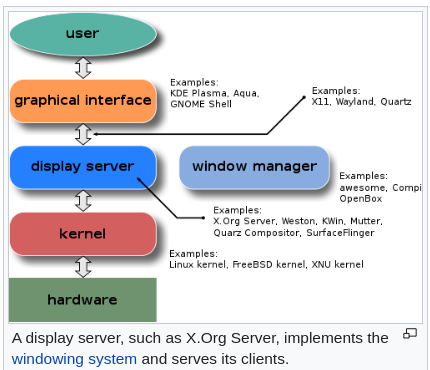
A display server is a program whose primary task is to coordinate the input and output of its clients to and from the rest of the operating system, the hardware, and each other. The display server communicates with its clients over the display server protocol.
The display server is a key component in any graphical user interface, specifically the windowing system. It is the basic component of Graphical User Interface (GUI) which sits between the graphical interface and the kernel. So, thanks to a display server, you can use your computer with GUI. Without it, you would only be restricted to a command line interface. ref
Example:
- Wayland
- XFree86