Deploying Django application on DO app platform
March 5, 2024 |
permanent
DevOps #
- tags
- DO, Apps Platform, Django, Docker
Django #
Example s #
- file:~/Code/personal/apps/e-invoicing/Dockerfile
FROM debian:bullseye-slim # install python 3 and pip RUN apt-get update RUN apt-get install python3 -y RUN apt-get install virtualenv -y RUN apt-get install gettext -y RUN apt install python3-pip -y && pip3 install --upgrade pip # make python 3 default python environment RUN alias python=python3 ENV PYTHONDONTWRITEBYTECODE=1 ENV PYTHONUNBUFFERED=1 # copy project to container' WORKDIR /opt COPY . . RUN virtualenv -p python3 venv RUN /opt/venv/bin/pip install -r requirements.txt # RUN virtualenv -p python3 venv # RUN source venv/bin/activate # RUN pip install -r requirements.txt # # install Django and Gunicorn dependencies from our requirements file # RUN cd /workspace && pip install -r requirements.txt # RUN cd e_invoicing && /opt/venv/bin/python manage.py migrate # RUN cd e_invoicing && /opt/venv/bin/python manage.py makemessages -l ar RUN chmod ug+x /opt/start.sh # CMD specifies the command to execute to start the server running. EXPOSE 8020 STOPSIGNAL SIGTERM CMD ["/opt/start.sh"]start.sh#!/bin/bash # keep run commands here to avoid env variables problem cd /opt/e_invoicing /opt/venv/bin/python manage.py makemessages -l ar /opt/venv/bin/python manage.py compilemessages /opt/venv/bin/python manage.py migrate echo Starting Gunicorn. exec /opt/venv/bin/gunicorn --reload e_invoicing.wsgi:application \ --bind 0.0.0.0:8020 - file:~/Code/personal/apps/product-inference/Dockerfile
Django with PostgreSQL and WhiteNoise #
Dockerfile #
file:~/Code/work/apps/projectx/Dockerfile
# Use an official Python runtime based on Debian 10 "buster" as a parent image.
FROM python:3.8.1-slim-buster

# Add user that will be used in the container.
RUN useradd django

# Port used by this container to serve HTTP.
EXPOSE 8000

# Set environment variables.
# 1. Force Python stdout and stderr streams to be unbuffered.
# 2. Set PORT variable that is used by Gunicorn. This should match "EXPOSE"
#    command.
ENV PYTHONUNBUFFERED=1 \
    PORT=8000

# Install system packages required by Django and Django.
RUN apt-get update --yes --quiet && apt-get install --yes --quiet --no-install-recommends \
    build-essential \
    libpq-dev \
    libmariadbclient-dev \
    libjpeg62-turbo-dev \
    zlib1g-dev \
    libwebp-dev \
 && rm -rf /var/lib/apt/lists/*

# Install the application server.
RUN pip install "gunicorn==20.0.4"

# Install the project requirements.
COPY requirements.txt /
RUN pip install -r /requirements.txt

# Use /app folder as a directory where the source code is stored.
WORKDIR /app

# Set this directory to be owned by the "django" user. This Django project
# uses SQLite, the folder needs to be owned by the user that
# will be writing to the database file.
RUN chown django:django /app

# Copy the source code of the project into the container.
COPY --chown=django:django . .

WORKDIR /app/projectx

# Use user "django" to run the build commands below and the server itself.
USER django

# Collect static files.
RUN python manage.py collectstatic --noinput --clear

# Runtime command that executes when "docker run" is called, it does the
# following:
#   1. Migrate the database.
#   2. Start the application server.
# WARNING:
#   Migrating database at the same time as starting the server IS NOT THE BEST
#   PRACTICE. The database should be migrated manually or using the release
#   phase facilities of your hosting platform. This is used only so the
#   Django instance can be started with a simple "docker run" command.
CMD set -xe; python manage.py migrate --noinput; gunicorn projectx.wsgi:application
Django settings #
file:~/Code/work/apps/projectx/projectx/projectx/settings.py
from pathlib import Path
# ******* additions *******
import os
import sys
import dj_database_url

# ******* additions end *******

# Build paths inside the project like this: BASE_DIR / 'subdir'.
BASE_DIR = Path(__file__).resolve().parent.parent


# Quick-start development settings - unsuitable for production
# See https://docs.djangoproject.com/en/4.1/howto/deployment/checklist/

# SECURITY WARNING: keep the secret key used in production secret!
SECRET_KEY = "django-insecure-kds(kpr9af7kx46*p#f-76mm($r=ef1*eqv2r$i8pmnuoczmhj"

# SECURITY WARNING: don't run with debug turned on in production!
DEBUG = True

ALLOWED_HOSTS = []

# Application definition

INSTALLED_APPS = [
    "django.contrib.admin",
    "django.contrib.auth",
    "django.contrib.contenttypes",
    "django.contrib.sessions",
    "django.contrib.messages",
    "django.contrib.staticfiles",
    # authored
    "app",
]

MIDDLEWARE = [
    "django.middleware.security.SecurityMiddleware",
    # ******* additions *******
    # to serve static files from container with whitenoise
    "whitenoise.middleware.WhiteNoiseMiddleware",
    # ******* end additions *******
    "django.contrib.sessions.middleware.SessionMiddleware",
    "django.middleware.common.CommonMiddleware",
    "django.middleware.csrf.CsrfViewMiddleware",
    "django.contrib.auth.middleware.AuthenticationMiddleware",
    "django.contrib.messages.middleware.MessageMiddleware",
    "django.middleware.clickjacking.XFrameOptionsMiddleware",
]

ROOT_URLCONF = "projectx.urls"

TEMPLATES = [
    {
        "BACKEND": "django.template.backends.django.DjangoTemplates",
        "DIRS": [],
        "APP_DIRS": True,
        "OPTIONS": {
            "context_processors": [
                "django.template.context_processors.debug",
                "django.template.context_processors.request",
                "django.contrib.auth.context_processors.auth",
                "django.contrib.messages.context_processors.messages",
            ],
        },
    },
]

WSGI_APPLICATION = "projectx.wsgi.application"


# Database
# https://docs.djangoproject.com/en/4.1/ref/settings/#databases

DATABASES = {
    "default": {
        "ENGINE": "django.db.backends.sqlite3",
        "NAME": BASE_DIR / "db.sqlite3",
    }
}


# Password validation
# https://docs.djangoproject.com/en/4.1/ref/settings/#auth-password-validators

AUTH_PASSWORD_VALIDATORS = [
    {
        "NAME": "django.contrib.auth.password_validation.UserAttributeSimilarityValidator",
    },
    {
        "NAME": "django.contrib.auth.password_validation.MinimumLengthValidator",
    },
    {
        "NAME": "django.contrib.auth.password_validation.CommonPasswordValidator",
    },
    {
        "NAME": "django.contrib.auth.password_validation.NumericPasswordValidator",
    },
]


# Internationalization
# https://docs.djangoproject.com/en/4.1/topics/i18n/

LANGUAGE_CODE = "en-us"

TIME_ZONE = "UTC"

USE_I18N = True

USE_TZ = True


# Static files (CSS, JavaScript, Images)
# https://docs.djangoproject.com/en/4.1/howto/static-files/

STATIC_URL = "static/"

# Default primary key field type
# https://docs.djangoproject.com/en/4.1/ref/settings/#default-auto-field

DEFAULT_AUTO_FIELD = "django.db.models.BigAutoField"

# ******* additions *******
STATIC_ROOT = os.path.join(BASE_DIR, "collect_static")
STATIC_URL = "/static/"


DEVELOPMENT_MODE = os.getenv("DEVELOPMENT_MODE", "off") == "on"

if DEVELOPMENT_MODE is True:
    DATABASES = {
        "default": {
            "ENGINE": "django.db.backends.sqlite3",
            "NAME": os.path.join(BASE_DIR, "db.sqlite3"),
        }
    }
elif len(sys.argv) > 0 and sys.argv[1] != 'collectstatic':
    DEBUG = os.getenv("DJANGO_DEBUG", "off") == "on"
    # because collectstatic is run while building the image
    if os.getenv("DATABASE_URL", None) is None:
        raise Exception("DATABASE_URL environment variable not defined")
    DATABASES = {
        "default": dj_database_url.parse(os.environ.get("DATABASE_URL")),
    }
    ALLOWED_HOSTS = os.getenv("DJANGO_ALLOWED_HOSTS", "*").split(";")
    CSRF_TRUSTED_ORIGINS = os.getenv("DJANGO_CSRF_TRUSTED_ORIGINS", "*").split(";")

 # ******* additions end *******
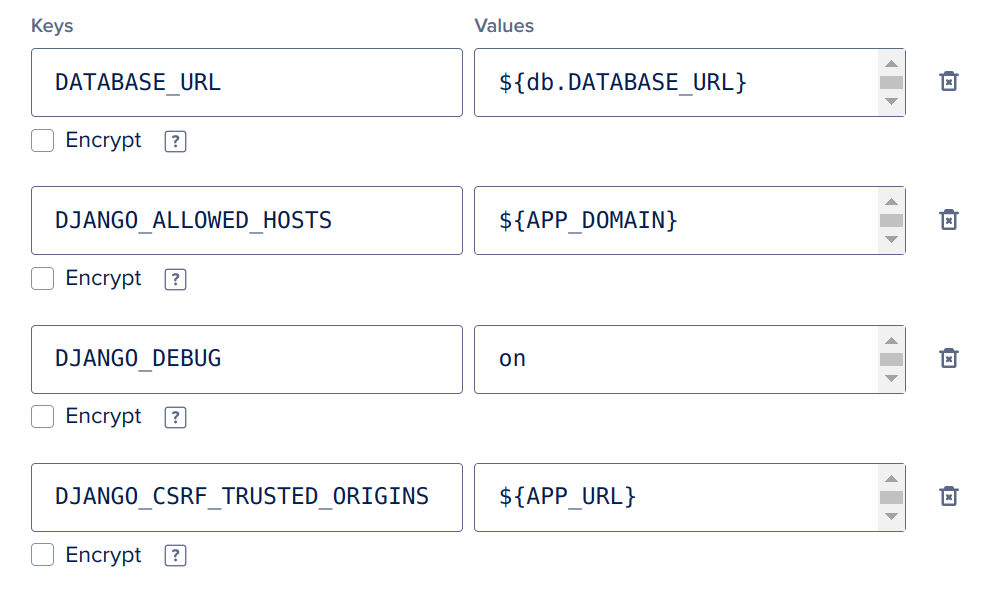
Configurations at App Platform #
DATABASE_URL=${db.DATABASE_URL}
DJANGO_DEBUG=off # default is off
DJANGO_CSRF_TRUSTED_ORIGINS=${APP_DOMAIN}
DJANGO_ALLOWED_HOSTS=${APP_DOMAIN}
Django with PostgreSQL, WhiteNoise and (S3 or DO Spaces) #
Wagtail #
TODO #
- file:~/Code/personal/cmss/wagtail_in_container/Dockerfile
# Use an official Python runtime based on Debian 10 "buster" as a parent image.
FROM python:3.8.1-slim-buster

# Add user that will be used in the container.
RUN useradd wagtail

# Port used by this container to serve HTTP.
EXPOSE 8000

# Set environment variables.
# 1. Force Python stdout and stderr streams to be unbuffered.
# 2. Set PORT variable that is used by Gunicorn. This should match "EXPOSE"
#    command.
ENV PYTHONUNBUFFERED=1 \
    PORT=8000

# Install system packages required by Wagtail and Django.
RUN apt-get update --yes --quiet && apt-get install --yes --quiet --no-install-recommends \
    build-essential \
    libpq-dev \
    libmariadbclient-dev \
    libjpeg62-turbo-dev \
    zlib1g-dev \
    libwebp-dev \
 && rm -rf /var/lib/apt/lists/*

# Install the application server.
RUN pip install "gunicorn==20.0.4"

# Install the project requirements.
COPY requirements.txt /
RUN pip install -r /requirements.txt

# Use /app folder as a directory where the source code is stored.
WORKDIR /app

# Set this directory to be owned by the "wagtail" user. This Wagtail project
# uses SQLite, the folder needs to be owned by the user that
# will be writing to the database file.
RUN chown wagtail:wagtail /app

# Copy the source code of the project into the container.
COPY --chown=wagtail:wagtail . .

# Use user "wagtail" to run the build commands below and the server itself.
USER wagtail

# Collect static files.
RUN python manage.py collectstatic --noinput --clear

# Runtime command that executes when "docker run" is called, it does the
# following:
#   1. Migrate the database.
#   2. Start the application server.
# WARNING:
#   Migrating database at the same time as starting the server IS NOT THE BEST
#   PRACTICE. The database should be migrated manually or using the release
#   phase facilities of your hosting platform. This is used only so the
#   Wagtail instance can be started with a simple "docker run" command.
CMD set -xe; python manage.py migrate --noinput; gunicorn mysite.wsgi:application
Celery worker #
TODO #
Connecting Django or Wagtail to Databases from container #
When a database is attached to the app container, an environment variable DATABASE_URL will be added
automatically.
DATABASE_URL=$invoice-prod-cluster.DATABASE_URL # $database-name.DATABASE_URL
This injected connection string can be converted into Django setting’s database dictionary using dj-database-url app.
This can be changed to point to any connection string
DATABASE_URL=sqlite:////full/path/to/your/database/file.sqlite
Relative path example
DATABASE_URL=sqlite://./db.sqlite3
examples of URL schemas support by dj-database-url
Engine	Django Backend	URL
PostgreSQL	django.db.backends.postgresql [1]	postgres://USER:PASSWORD@HOST:PORT/NAME [2]
PostGIS	django.contrib.gis.db.backends.postgis	postgis://USER:PASSWORD@HOST:PORT/NAME
MSSQL	sql_server.pyodbc	mssql://USER:PASSWORD@HOST:PORT/NAME
MSSQL [5]	mssql	mssqlms://USER:PASSWORD@HOST:PORT/NAME
MySQL	django.db.backends.mysql	mysql://USER:PASSWORD@HOST:PORT/NAME
MySQL (GIS)	django.contrib.gis.db.backends.mysql	mysqlgis://USER:PASSWORD@HOST:PORT/NAME
SQLite	django.db.backends.sqlite3	sqlite:///PATH [3]
SpatiaLite	django.contrib.gis.db.backends.spatialite	spatialite:///PATH [3]
Oracle	django.db.backends.oracle	oracle://USER:PASSWORD@HOST:PORT/NAME [4]
Oracle (GIS)	django.contrib.gis.db.backends.oracle	oraclegis://USER:PASSWORD@HOST:PORT/NAME
Redshift	django_redshift_backend	redshift://USER:PASSWORD@HOST:PORT/NAME
CockroachDB	django_cockroachdb	cockroach://USER:PASSWORD@HOST:PORT/NAME
Timescale [6]	timescale.db.backends.postgresql	timescale://USER:PASSWORD@HOST:PORT/NAME
Timescale (GIS) [6]	timescale.db.backend.postgis	timescalegis://USER:PASSWORD@HOST:PORT/NAME