Celery
Python Apps #
Distributed task queue in python
Implementation Details #
tutorial followed for Django integration #
- https://realpython.com/asynchronous-tasks-with-django-and-celery/
- module used for Django integration: https://github.com/celery/django-celery-beat
Django NAME space settings #
from django.conf import settings

import os
from celery import Celery

os.environ.setdefault('DJANGO_SETTINGS_MODULE', 'epay.settings')

app = Celery('epay')

app.config_from_object('django.conf:settings', namespace='CELERY')
# value of namespace means all the celery settings will start with "CELERY_"
#ref: https://stackoverflow.com/a/54839366/5305401
app.autodiscover_tasks()
shared_app vs app.task #
this redit gives good info about this. summary: when the celery app that executes that task is not in the local project used shared_task.
example of app.task #
#epay/epay/celery.py # directory that contains settings
from django.conf import settings

import os
from celery import Celery

os.environ.setdefault('DJANGO_SETTINGS_MODULE', 'epay.settings')

app = Celery('epay')
app.config_from_object('django.conf:settings', namespace='CELERY')

app.autodiscover_tasks()
#epay/epay/_init_.py
from __future__ import absolute_import, unicode_literals
from .celery import app as celery_app

__all__ = ['celery_app']
#epay/app/tasks.py
from celery import Celery
from celery.signals import task_failure
import requests
from django.conf import settings
import json
import time
from requests.auth import HTTPBasicAuth
from .models import Order, ClientApp, Session, ClientSession, Department
from epay.celery import app as celery_app


WAIT_IN_SECS_BEFORE_NEXT_CALL = 2


@celery_app.task(queue="epay")
def reconcile_all_missing_orders():
    sessions = Session.objects.filter(
       order=None
    )
    for session in sessions:
        reconcile_a_missing_session(session)

def reconcile_a_missing_session(session):
    transaction_response = fetch_order_details_from_bank(session.order_id)
    if _was_session_completed_successfully(transaction_response):
    # if _was_api_call_successfull(transaction_response) and _was_payment_transaction_successfull(transaction_response):
    #     # not storing order details again her because they are stored in
    #     # Order model already
    #     amount_to_be_paid = session.client_app.payment_amount
    #     paid_amount = transaction_response.get("amount")
    #     if paid_amount == amount_to_be_paid:
    #         session.reconciliation_details = {"kfupm_status": "paid"}
    #     else:
    #         session.reconciliation_details = {"kfupm_status": "partially_paid"}
    #     session.save()
    # elif transaction_response.get("error") or transaction_response.get("result") != "SUCCESS":
        session.reconciliation_details = transaction_response
        session.was_transaction_completed = True
        session.save()
        print(transaction_response)
        # continue
    else:
        session.was_transaction_completed = False
        session.save()
    try:
        order = Order.objects.create(
            session=session,
            all_details=transaction_response,
            status=transaction_response.get("result"),
        )
    except IntegrityError:
        order = Order.objects.get(session=session)
    time.sleep(
        WAIT_IN_SECS_BEFORE_NEXT_CALL
    )  # sleep before next API call to avoid making too many calls om short time

def _was_session_completed_successfully(transaction_response):
    return transaction_response.get("error", None) is None


def _was_api_call_successfull(transaction_response):
     return transaction_response.get("result") == "SUCCESS"

def _was_payment_transaction_successfull(transaction_response):
     return transaction_response.get("status") == "CAPTURED"

def fetch_order_details_from_bank(order_id):
    res = requests.get(
        "{}/{}/order/{}".format(
            settings.BANK_GATEWAY_API, settings.BANK_MERCHANT_ID, order_id
        ),
        auth=HTTPBasicAuth(settings.BANK_API_USERNAME, settings.BANK_API_PASSWORD),
    )
    result = json.loads(res.text)
    return result
delay vs apply_async #
delay() is the quickest way to send a task message to Celery. delay() method is a shortcut to the more powerful .apply_async(), which additionally supports execution options for fine-tuning your task message.
send_feedback_email_task.apply_async(args=[
    self.cleaned_data["email"], self.cleaned_data["message"]
    ]
)
How does it work? #
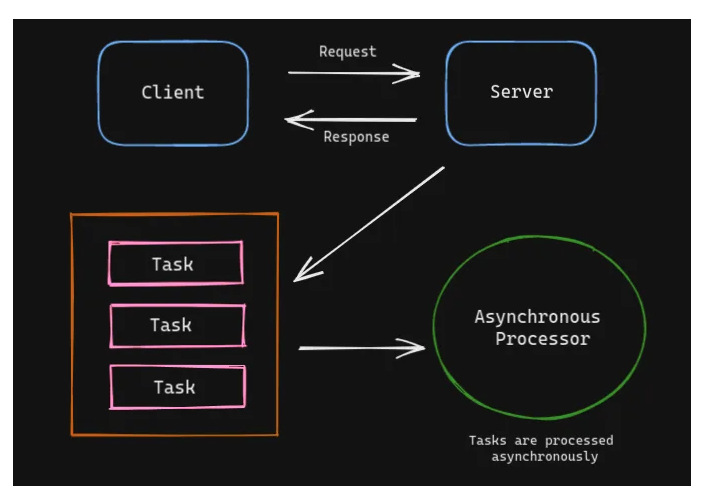
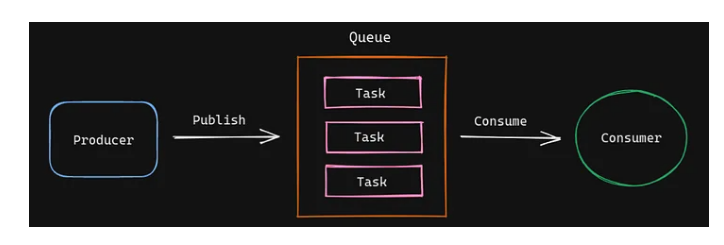
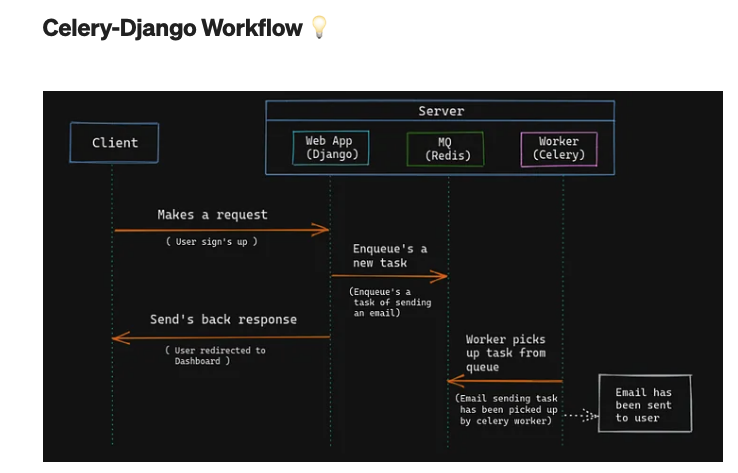
Celery with Redis #
Connecting celery with TLS on OCI #
# celery
if is_env_var_set("CELERY_BROKER_ENDPOINT"):
    print("CELERY_BROKER_ENDPOINT is set")
    # Use 'rediss://' instead of 'redis://' for SSL connections
    # ** Note **
    #  CELERY_BROKER_URL env variable will be pickeup by the celery
    # use different name of env variable if not injecting complete endpoint
    CELERY_BROKER_URL = (
        # note the rediss:// instead of redis:// to use SSL
        "rediss://" +
        os.getenv("CELERY_BROKER_ENDPOINT") +
        ":6379" + "/0" +
        "?ssl_cert_reqs=required"
    )
    print("CELERY_BROKER_URL")
    print(CELERY_BROKER_URL)
else:
    CELERY_BROKER_URL = 'redis://localhost:6379/0'
export CELERY_BROKER_URL="xyz.redis.region.oci.oraclecloud.com"
my stackoverflow anwser related to a difficult to debug issue I faced
Instrumentation with OpenTelemetry #
def config_trace(service_name):
    APM_ENDPOINT_URL = os.environ.get("APM_ENDPOINT_URL")
    APM_PUBLIC_KEY = os.environ.get("APM_PUBLIC_KEY")
    apm_upload_endpoint_url = f"https://{APM_ENDPOINT_URL}/20200101/observations/public-span?dataFormat=zipkin&dataFormatVersion=2&dataKey={APM_PUBLIC_KEY}"
    print("APM Endpoint URL:")
    print(apm_upload_endpoint_url)

    zipkin_exporter = ZipkinExporter(
        endpoint=apm_upload_endpoint_url,
        # Add other parameters as necessary
    )


    # Set up the tracer provider and processor
    trace.set_tracer_provider(
        TracerProvider(
            resource=Resource.create(
                {
                    "service.name": service_name,
                    "service.instance.id": "instance-replace-with-env-var",
                }
            )
        )
    )
    trace.get_tracer_provider().add_span_processor(BatchSpanProcessor(zipkin_exporter))
    return trace
    # DjangoInstrumentor uses DJANGO_SETTINGS_MODULE to instrument the project.
    # Make sure the var is available before you call the DjangoInstrumentor.

@worker_process_init.connect(weak=False)
def init_celery_tracing(*args, **kwargs):
    print("********** worker_process_init **********")
    print("********** init_celery_tracing **********")
    trace = config_trace("worker-i-a")
    CeleryInstrumentor().instrument()
    tracer = trace.get_tracer(__name__)
    return tracer
celery -A invoicing_apis beat --loglevel=info & celery -A invoicing_apis worker --loglevel=info -P prefork
Celery Execution Pool #
ref When you start a Celery worker on the command line via celery –app=…, you just start a supervisor process. The Celery worker itself does not process any tasks (with one notable exception, which I will get to later).
It spawns child processes (or threads) and deals with all the bookkeeping stuff. The child processes (or threads) execute the actual tasks. These child processes (or threads) are also known as the execution pool.
The –pool command line argument is optional. If not specified, Celery defaults to the prefork execution pool.
prefork #
$ celery worker --app=worker.app
The prefork pool implementation is based on Python’s multiprocessing package. It allows your Celery worker to side-step Python’s Global Interpreter Lock and fully leverage multiple processors on a given machine.
You want to use the prefork pool if your tasks are CPU-bound. A task is CPU-bound, if it spends the majority of its time using the CPU (crunching numbers). Your task could only go faster if your CPU were faster.
The number of available cores limits the number of concurrent processes. It only makes sense to run as many CPU-bound tasks in parallel as there are CPUs available.
This is why Celery defaults to the number of CPUs available on the machine if the –concurrency argument is not set. Start a worker using the prefork pool, using as many processes as there are CPUs available:
threads #
$ celery worker --app=worker.app --pool=threads
The threads pool is Celery’s latest addition to the pool zoo and was introduced back in 2019. It uses Python’s ThreadPoolExecutor. These threads are real OS threads, managed directly by the operating system kernel.
The threads pool does what it says on the tin and is suitable for tasks that are I/O bound. A task is I/O bound if it spends the majority of its time waiting for an Input/Output operation to finish. Your task could only go faster if the Input/Output operation were faster.
Just like in the prefork case, Celery defaults to the number of CPUs available on the machine if no –concurrency is specified. This behaviour is slightly misleading because Python’s Global Interpreter Lock (GIL) still reigns. Even if you have 4 CPUs and have Celery spawn 4 worker threads, only one thread can execute Python bytecode at any given time.
solo #
The solo pool is a bit of a special execution pool. Strictly speaking, the solo pool is neither threaded nor process-based. More strictly speaking, the solo pool is not even a pool as it is always solo. Even more strictly speaking, the solo pool contradicts the principle that the worker does not process any tasks.
The solo pool runs inside the worker process. It runs inline which means there is no bookkeeping overhead. This makes the solo worker fast. But it also blocks the worker during task execution. Which has some implications when remote-controlling workers.*
# start celery worker in solo mode
$ celery worker --app=worker.app --pool=solo
The solo pool is an interesting option when running CPU-intensive tasks in a Microservice environment. For example, in a Kubernetes context, managing the worker pool size can be easier than managing multiple execution pools. Instead of managing the execution pool size per worker(s), you manage the total number of workers.
It’s usage
celery -A scraping_websites.celery_tasks worker --loglevel=INFO -P solo --queues=ner_and_storeI used this process to run Machine Learning based inferences, other processes breaking, only solo worked.
eventlet and gevent #
Let’s say you need to execute thousands of HTTP GET requests to fetch data from external REST APIs. The time it takes to complete a single GET request depends almost entirely on the time it takes the server to handle that request. Most of the time, your tasks wait for the server to send the response, not using any CPU.
The bottleneck for this kind of task is not the CPU. The bottleneck is waiting for an Input/Output operation to finish. This is an Input/Output-bound task (I/O bound). The time the task takes to complete is determined by the time spent waiting for an input/output operation to finish.
Lessons learned in invoicing-apis or clix e-invoicing project #
- in simulation environment PCSID was getting generated only with requests.post (not with requests.session) and “solo” pool, all the other pool types were failing
celery -A invoicing_apis.celery_app worker --loglevel=debug --pool=solo
OCR of Images #
2023-12-30_14-30-13_screenshot.png #
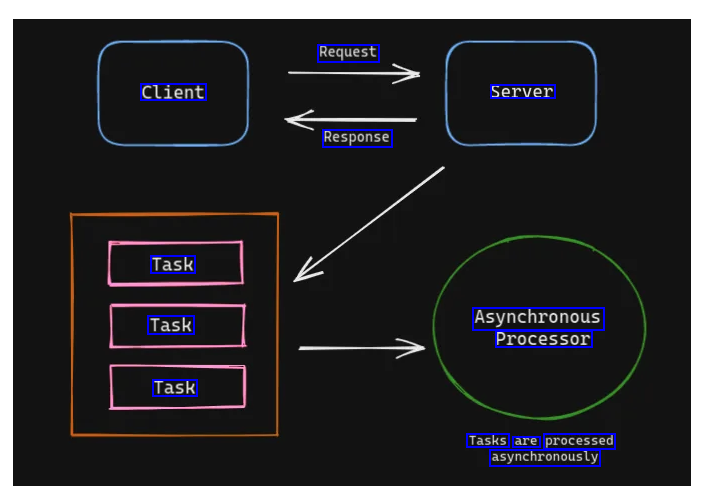
Request Client server Response Task Task Asynchronous Processor Task Tasks are processed asynchronously
2023-12-30_14-30-20_screenshot.png #
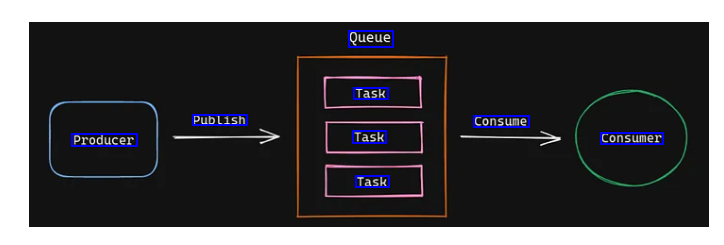
Queue Task Publish Consume Producer Task consumer Task
2023-12-30_14-30-30_screenshot.png #
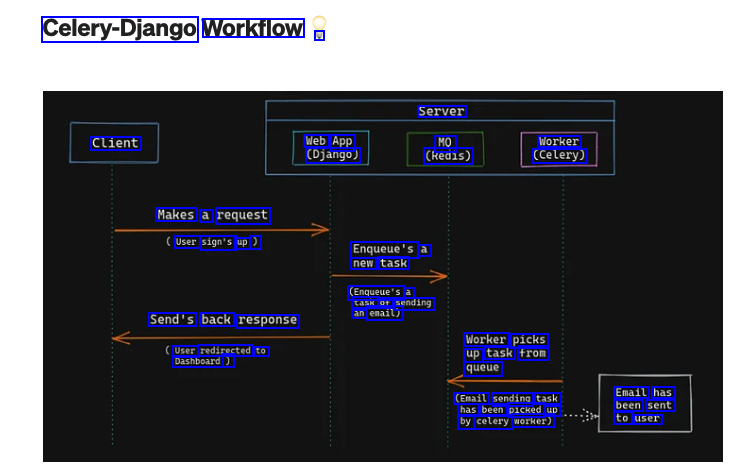
Celery-Django Workflow V Server Client Web App (Django) MQ (Redis) Worker (Celery) Makes a request User sign's up ) Enqueue's a new task (Enqueue's a task of sending an email) Send's back response Worker picks up task from queue User redirected to Dashboard ) (Email sending task has been picked up by celery worker) Email has been sent to user