Apps Platform
Platform #
- tags
- DigitalOcean, DevOps, Docker,
Everything runs on multitentant Kubernetes clusters.
network isolation
auto build support.
global CDN and built in SSL are provided by cloudflare.
Monitoring and alerting is done with prometheus.
logging and CLI with the app platform UI is by fluent bit.
uses Buildpacks to detect project or language type and build the projects
uses [Ubuntu](/notes/ubuntu--20230917-124825/) [OS](/notes/operating_system--20230102-153457/) to build containers.
Key features #
The languages you love #
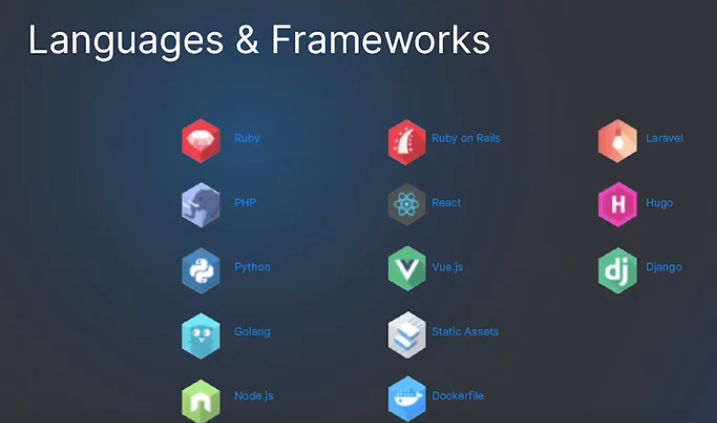
Out-of-the-box support for popular languages and frameworks like Node.js, Python, Django, Go, PHP, and static sites.
Built-in security #
We
- create, manage, and renew your SSL certificates to protect your apps from DDoS attacks and
- provide automatic OS patching for added security.
Scale with ease #
Scale horizontally or vertically to handle planned or unplanned traffic spikes—all while keeping your apps available.
Deploy faster #
Deploy code directly from your GitHub and GitLab repositories and automatically redeploy apps when you push updates to your source code.
Quickly add functions #
Easily add functions as components of your apps. Use these functions to quickly add serverless APIs to your web apps or mobile apps.
Secure your traffic #
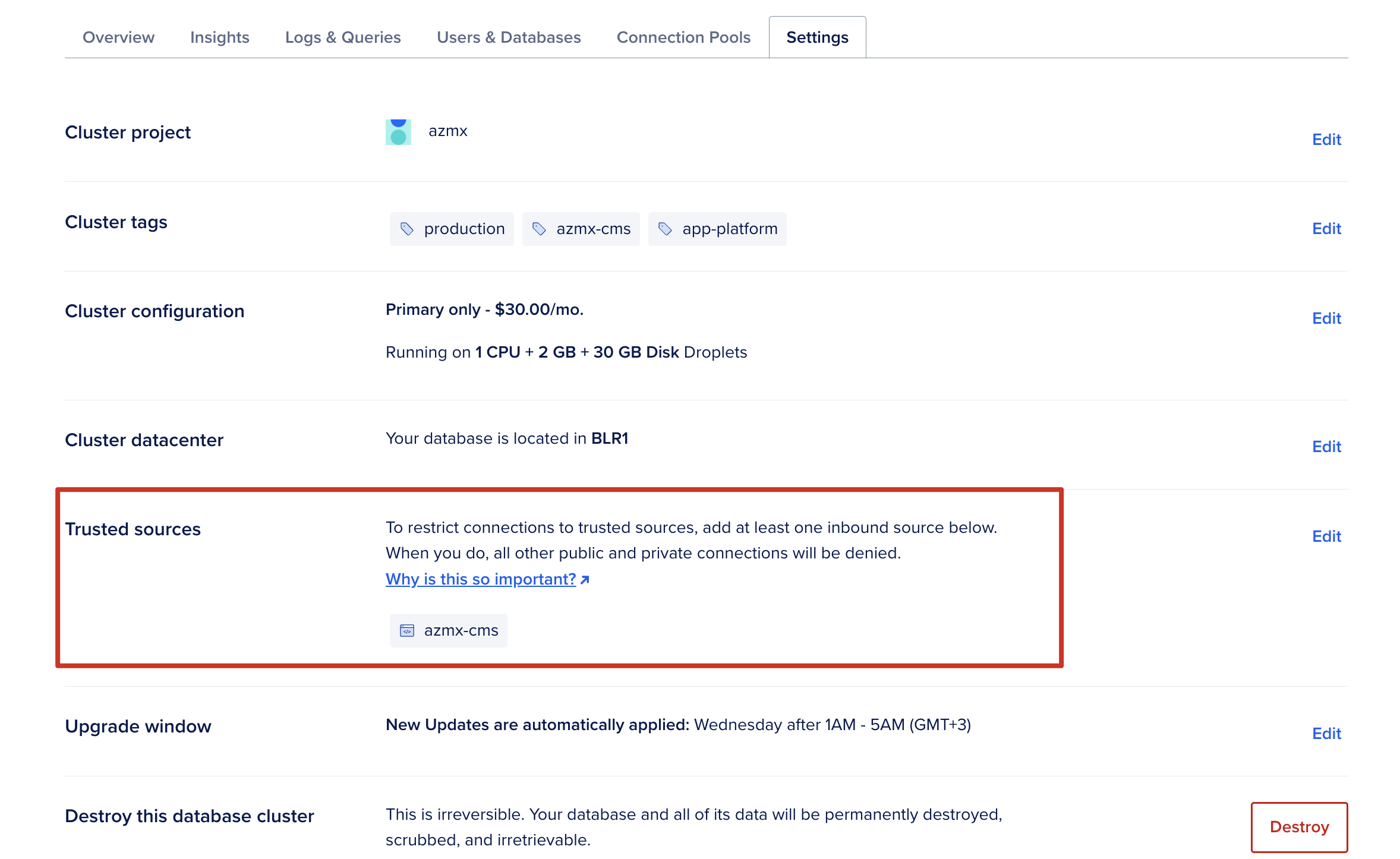
Securely connect your apps to Managed Databases using Trusted Sources, enabling a secure connection to the database that accepts traffic only from the app.
Rollback as needed #
- Track progress of deployments with clear indicators and
- easily rollback to previous deployments of the app.
Alerts, monitoring & insights #
Set up alerts and monitoring for events such as successful deployment and domain configuration. Gain insights into resources used by your app
Better log analysis #
Forward logs to external log providers such as Papertrail and Datadog for better analysis and troubleshooting.
Built with Open Source technologies #
Containers #
- Before 2022 they used
and now using , [[https://www.digitalocean.com/blog/faster-app-builds-with-app-platform][ref: DigitalOcean]
Use Cases or What can be built with Apps Platform #
Web apps #
Build dynamic apps in popular languages like Python, NodeJS
Static sites #
Create websites that are fast, secure, and highly scalable
APIs #
Add automation via APIs
Background workers #
Improve efficiency by adding background workers
What it is? #
Technical Details #
PaaS vs App Platform #
Supported platforms #
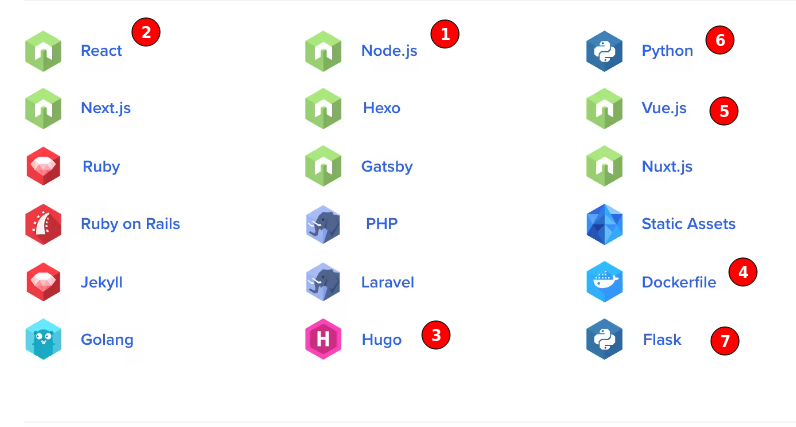
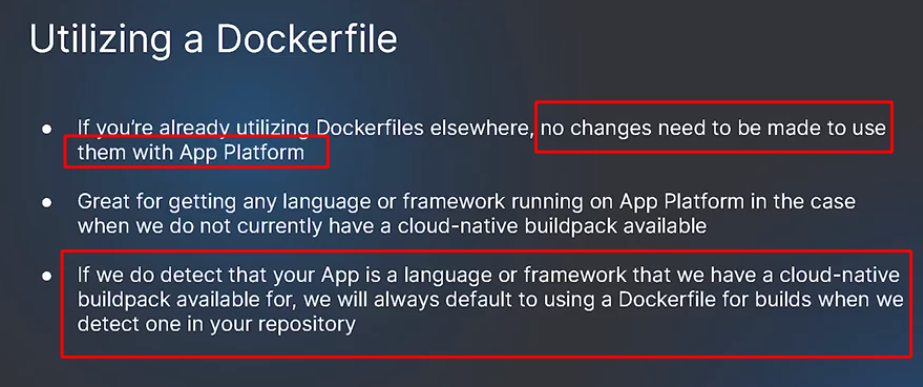
Dockerfile #
Defaults to even when buildpack is detected #
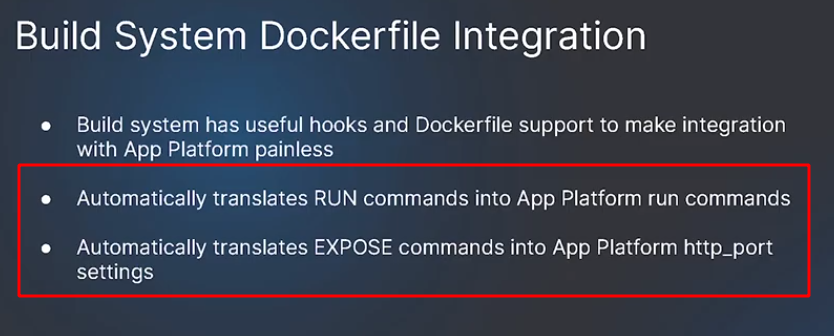
makes use of RUN and EXPOSE docker commands #
Examples
- file:~/Code/personal/apps/e-invoicing/Dockerfile
- file:~/Code/personal/apps/product-inference/Dockerfile
# Use an official Python runtime based on Debian 10 "buster" as a parent image.
FROM python:3.8.1-slim-buster

# Add user that will be used in the container.
RUN useradd wagtail

# Port used by this container to serve HTTP.
EXPOSE 8000

# Set environment variables.
# 1. Force Python stdout and stderr streams to be unbuffered.
# 2. Set PORT variable that is used by Gunicorn. This should match "EXPOSE"
#    command.
ENV PYTHONUNBUFFERED=1 \
    PORT=8000

# Install system packages required by Wagtail and Django.
RUN apt-get update --yes --quiet && apt-get install --yes --quiet --no-install-recommends \
    build-essential \
    libpq-dev \
    libmariadbclient-dev \
    libjpeg62-turbo-dev \
    zlib1g-dev \
    libwebp-dev \
&& rm -rf /var/lib/apt/lists/*

# Install the application server.
RUN pip install "gunicorn==20.0.4"

# Install the project requirements.
COPY requirements.txt /
RUN pip install -r /requirements.txt

# Use /app folder as a directory where the source code is stored.
WORKDIR /app

# Set this directory to be owned by the "wagtail" user. This Wagtail project
# uses SQLite, the folder needs to be owned by the user that
# will be writing to the database file.
RUN chown wagtail:wagtail /app

# Copy the source code of the project into the container.
COPY --chown=wagtail:wagtail . .

# Use user "wagtail" to run the build commands below and the server itself.
USER wagtail

# Collect static files.
# RUN python manage.py collectstatic --noinput --clear
# RUN python manage.py migrate --noinput
# RUN python manage.py load_initial_data
# Runtime command that executes when "docker run" is called, it does the
# following:
#   1. Migrate the database.
#   2. Start the application server.
# WARNING:
#   Migrating database at the same time as starting the server IS NOT THE BEST
#   PRACTICE. The database should be migrated manually or using the release
#   phase facilities of your hosting platform. This is used only so the
#   Wagtail instance can be started with a simple "docker run" command.
# CMD set -xe; gunicorn bakerydemo.wsgi:application

RUN chmod ug+x ./start.sh

CMD ["./start.sh"]
Start.sh
#!/bin/bash
# keep run commands here to avoid env variables problem

echo manage.py commands
python manage.py collectstatic --noinput --clear
python manage.py migrate --noinput
python manage.py load_initial_data

# when using translations i18n multilingual site
# python manage.py makemessages -l ar
# python manage.py compilemessages --noinput
echo Starting Gunicorn.
set -xe; gunicorn bakerydemo.wsgi:application
settings.py
# Database
# https://docs.djangoproject.com/en/3.1/ref/settings/#databases
DEVELOPMENT_MODE = os.getenv("DEVELOPMENT_MODE", "False") == "True"

if DEVELOPMENT_MODE is True:
    DATABASES =
        "default":
            "ENGINE": "django.db.backends.sqlite3",
            "NAME": os.path.join(BASE_DIR, "db.sqlite3"),


elif len(sys.argv) > 0 and sys.argv[1] != 'collectstatic':
    # because collectstatic is run while building the image
    if os.getenv("DATABASE_URL", None) is None:
        raise Exception("DATABASE_URL environment variable not defined")
    DATABASES =
        "default": dj_database_url.parse(os.environ.get("DATABASE_URL")),
Structure of the app #
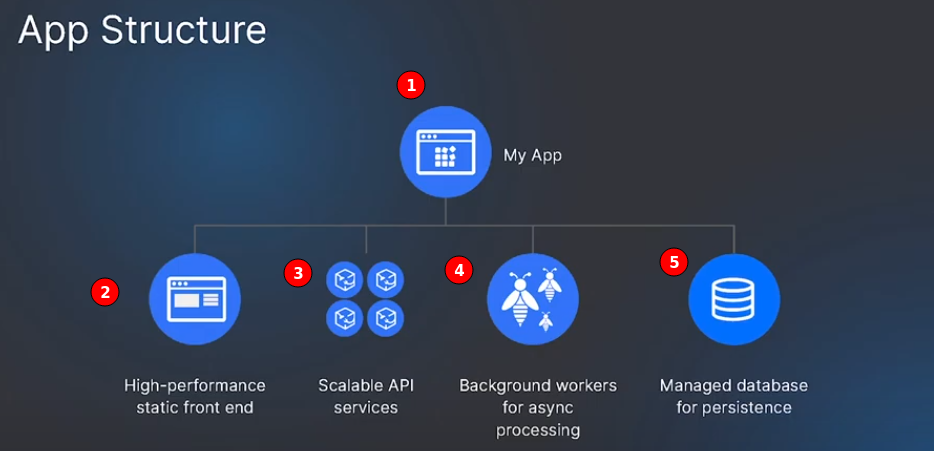
Flexibility #
Key takeaways #
Connecting to Database from app and env variables #
These env variables can be used to connect ref
- DATABASE_URL for the connection URL.
- DATABASE_PASSWORD for the password.
- DATABASE_USER for the username to use to connect.
- DATABASE_NAME for the name of the database cluster.
Resource configuration settings #
ref App Platform presents several configuration options, several of which may have been auto-filled during the app’s detection. You can configure the following options for your app:
Name #
Unique name for the resource.
Resource Type #
The type of app to be deployed, either a web service, static site, or worker service. This field determines which additional configuration options are available for your app on this screen.
Build Command #
Custom build commands to run upon deployment.
Run Command #
For web and worker services only. You can specify custom run commands for the application to run after deployment. If no run commands are specified, the default run command for your app’s language will be used, such as npm start for a Node.js app.
HTTP Port #
For web services only. The port that the app receives HTTP requests on. The default port is 8080.
HTTP Request Routes #
For web services and static sites only. The URL path where the app can be accessed, such as your-app-v3cl4.ondigitalocean.app/api. If not specified, the app will be accessible from the provided hostname’s root.
Output Directory #
For static sites only. An optional path to where the build assets will be located, relative to the build context. If not set, App Platform will automatically scan for these directory names: _static, dist, public, build.
Bindable env variables #
These variables can be indicated in the format of $BINDABLE_NAME. ref
- $my-service.BINDABLE_NAME.
- The _self prefix can be used to reference the current resource, for example $_self.BINDABLE_NAME
Application or App wide variables #
$APP_DOMAIN: Application’s primary domain. $APP_URL: Application’s primary domain in http format (e.g. https://my-domain.com). $APP_ID: Application’s ID.
Database #
- DATABASE_URL for the connection URL.
- DATABASE_PASSWORD for the password.
- DATABASE_USER for the username to use to connect.
- DATABASE_NAME for the name of the database cluster.
Strings can be constructed from variables
$<database component name>.<connection pool name>.VARIABLE_NAME. For example, to create a bindable variable for a pool’s connection string, you can use $mydb.mypool.DATABASE_URL.
Resource-Specific Variables #
Encrypt Environment Variables #
ref Click the Encrypt checkbox next to any variable to prevent its value from appearing in clear text in logging data.
Pricing #
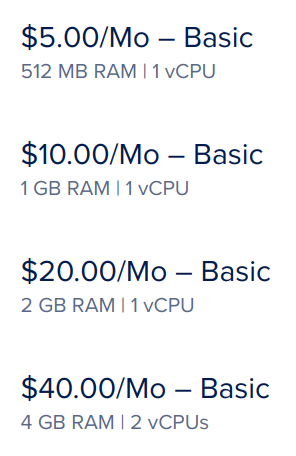
Basic starts from $5/month (512 MB RAM 1 vCPU) #
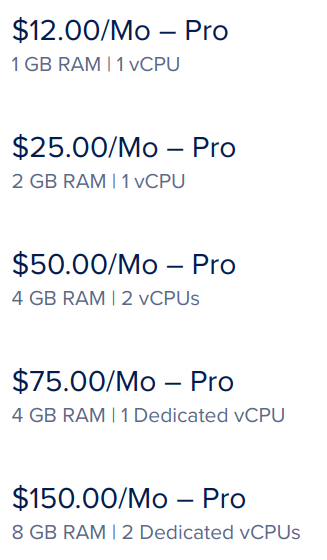
Pro starts from $12/month ( 1 GB RAM 1 vCPU) #
How to download files from container? #
Security #
Webserver #
Database #
Using Trusted sources and setting it to an app or droplet or IP is enough for DB security.
Details #
https://docs.digitalocean.com/products/databases/postgresql/how-to/secure/


OCR of Images #
2022-01-16_13-42-26_screenshot.png #
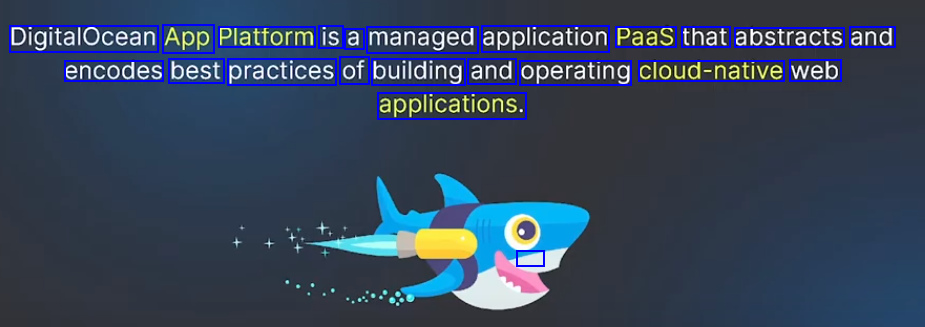
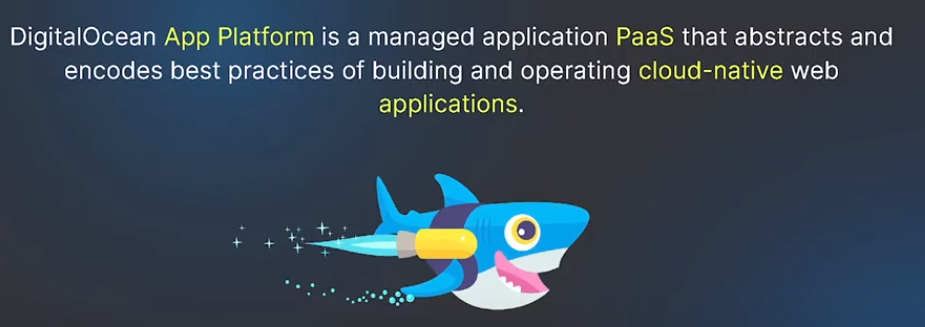
DigitalOcean App Platform is a managed application Paas that abstracts and encodes best practices of building and operating cloud-native web applications. -
2022-01-16_13-43-21_screenshot.png #
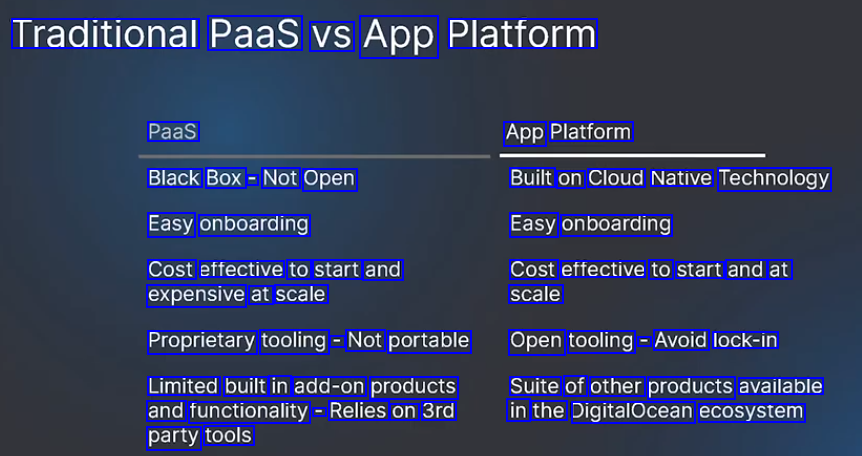
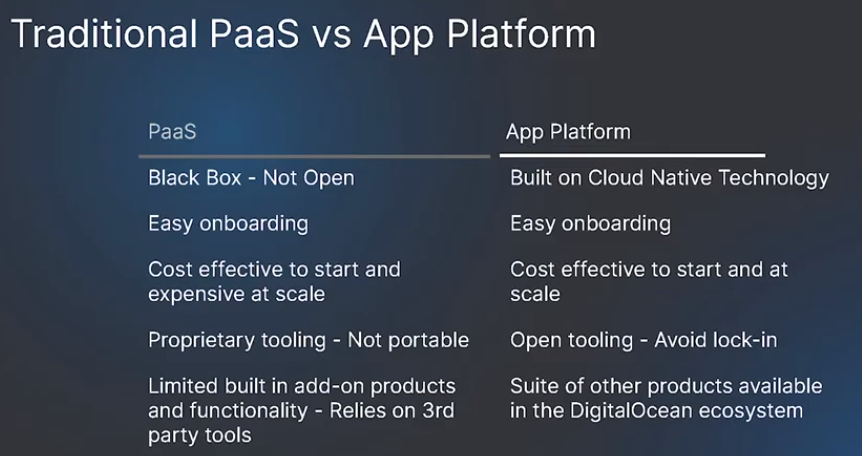
Traditional Paas VS App Platform Paas App Platform Black Box - Not Open Built on Cloud Native Technology Easy onboarding Easy onboarding Cost effective to start and expensive at scale Cost effective to start and at scale Proprietary tooling - Not portable Open tooling - Avoid lock-in Limited built in add-on products and functionality = Relies on 3rd Suite of other products available in the DigitalOcean ecosystem party tools
2022-01-16_13-46-22_screenshot.png #
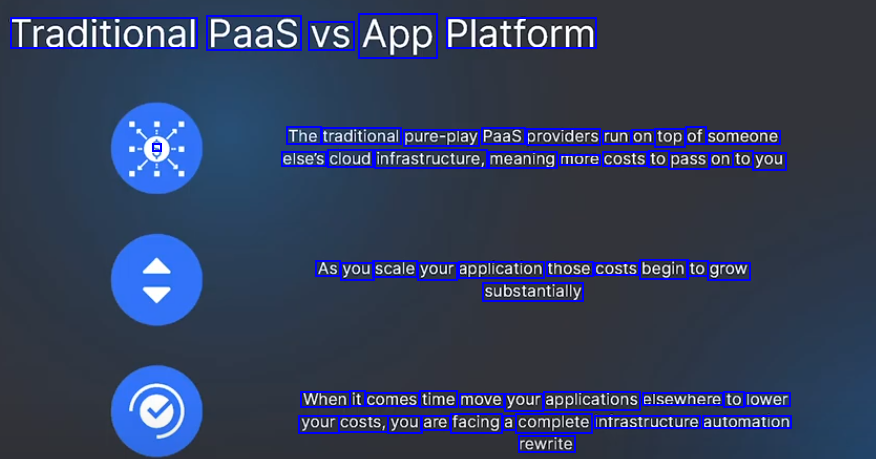
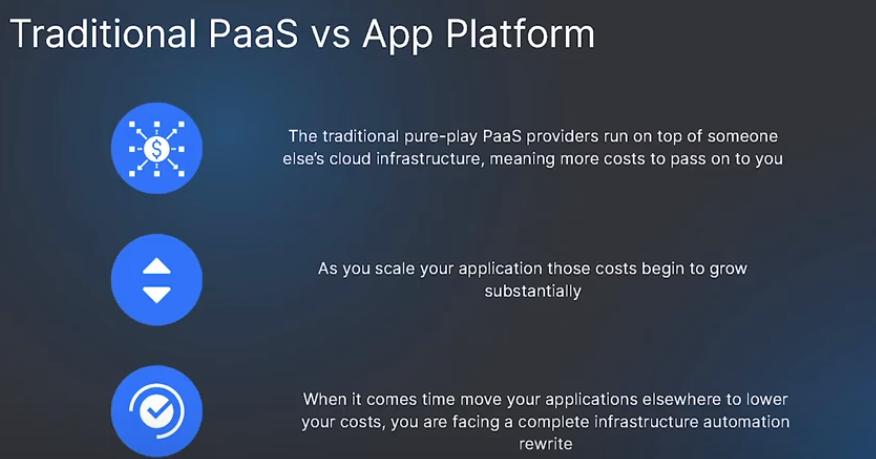
Traditional Paas VS App Platform The traditional pure-play Paas oroviders run on of someone top - else's cloud infrastructure, meaning more costs to pass on to you As you scale your application those costs begin to grow substantially When it comes time move your applications elsewhere to lower your costs, you are facing a complete Infrastructure automation rewrite
2022-01-16_13-36-58_screenshot.png #
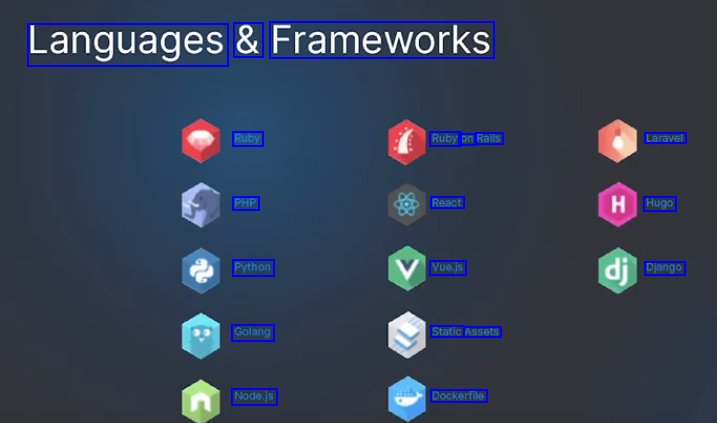
Languages & Frameworks Ruby Ruby on Rails Laravel PHP React Hugo Python Vue.js Django Golang Static Assets Node.js Dockerfile
2022-01-16_13-36-37_screenshot.png #
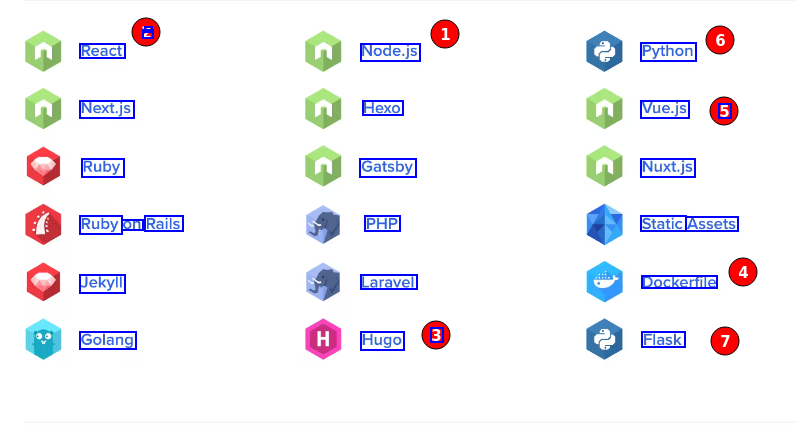
L React Node.js Python Next.js Hexo Vue.js 5 Ruby Gatsby Nuxt.js Ruby on Rails PHP Static Assets Jekyll Laravel Dockerfile Golang Hugo 3 Flask
2022-01-16_13-53-48_screenshot.png #
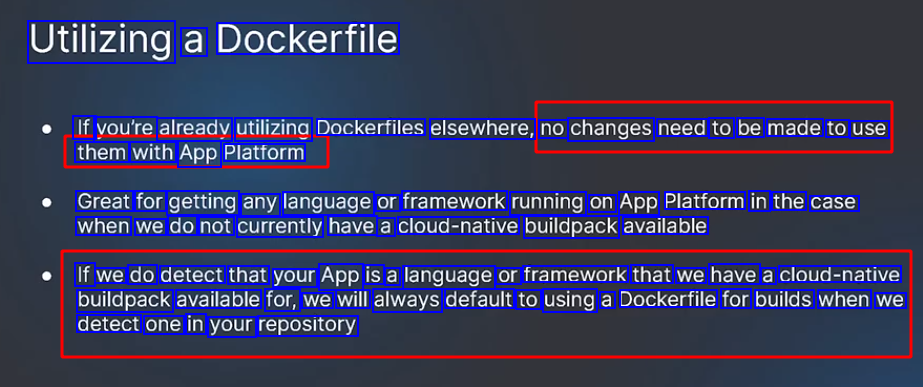
Utilizing a Dockerfile If vou're already utilizing Dockerfiles elsewhere, no changes need to be made to use them with App Platform Great for getting any language or framework running on App Platform in the case when we do not currently have a cloud-native buildpack available If we do detect that your App is a language or framework that we have a cloud-native buildpack available for, we will always default to using a Dockerfile for builds when we detect one in your repository
2022-01-16_13-54-50_screenshot.png #
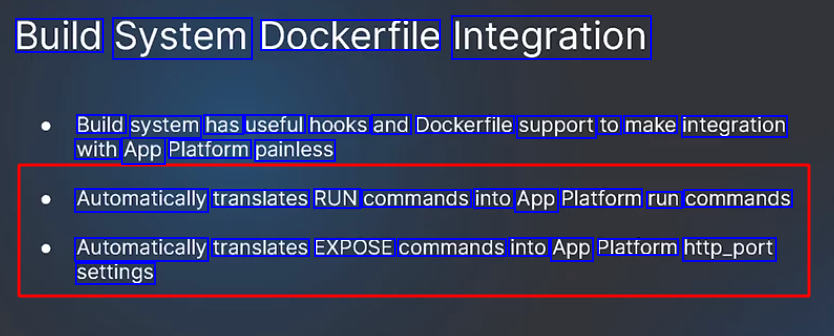
Build System Dockerfile Integration Build system has useful hooks and Dockerfile support to make integration with App Platform painless Automatically translates RUN commands into App Platform run commands Automatically translates EXPOSE commands into App Platform http_port settings
2022-01-16_13-56-09_screenshot.png #
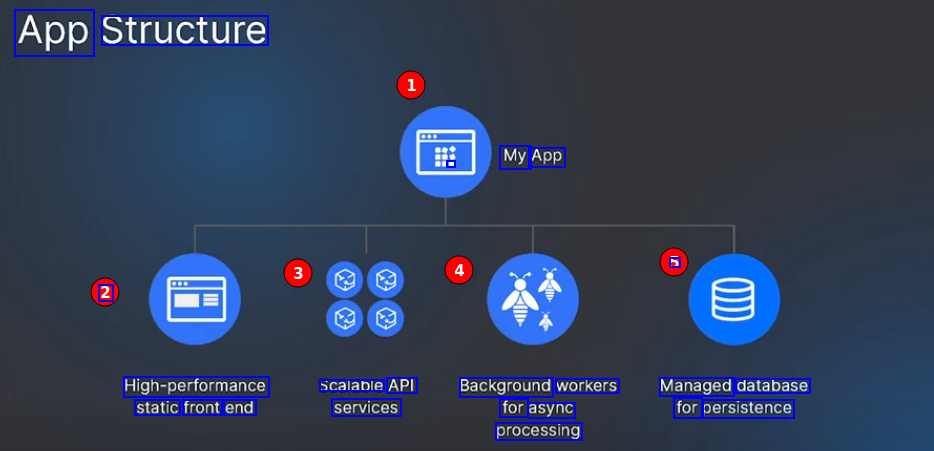
App Structure - My App 5 2 High-performance static front end scalable API services Background workers for async processing Managed database for persistence
2022-01-16_13-58-44_screenshot.png #
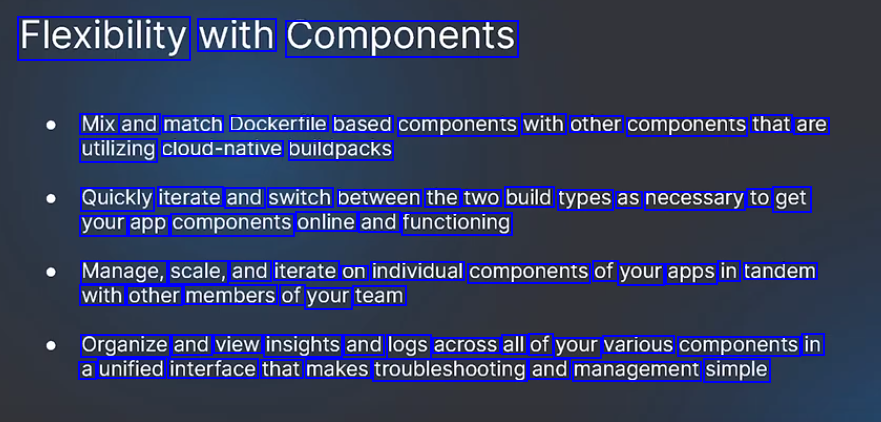
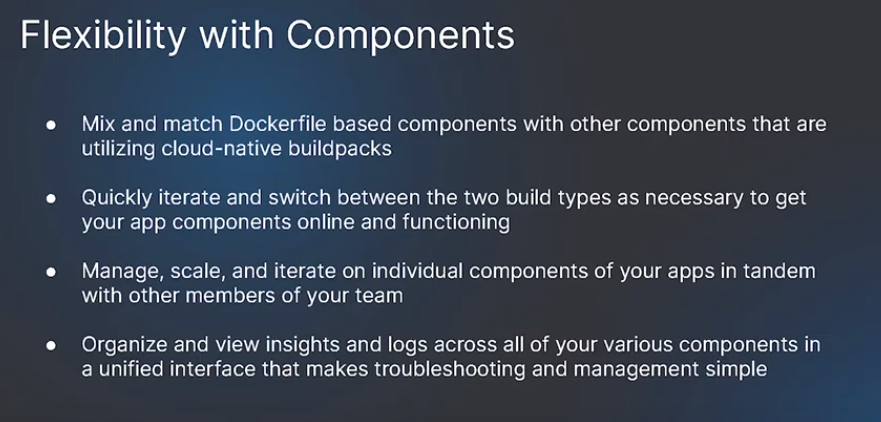
Flexibility with Components Mix and match Dockertile based components with other components that are utilizing cloud-native buildpacks Quickly iterate and switch between the two build types as necessary to get your app components online and functioning Manage, scale, and iterate on individual components of your apps in tandem with other members of your team Organize and view insights and logs across all of your various components in a unified interface that makes troubleshooting and management simple
2022-01-16_14-00-36_screenshot.png #
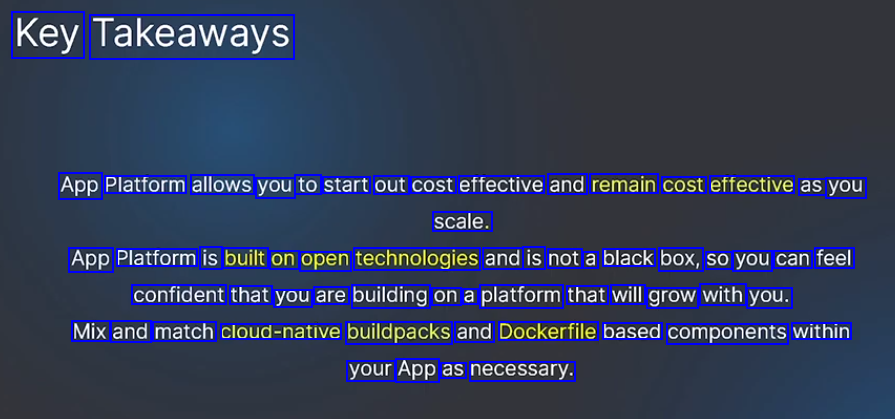
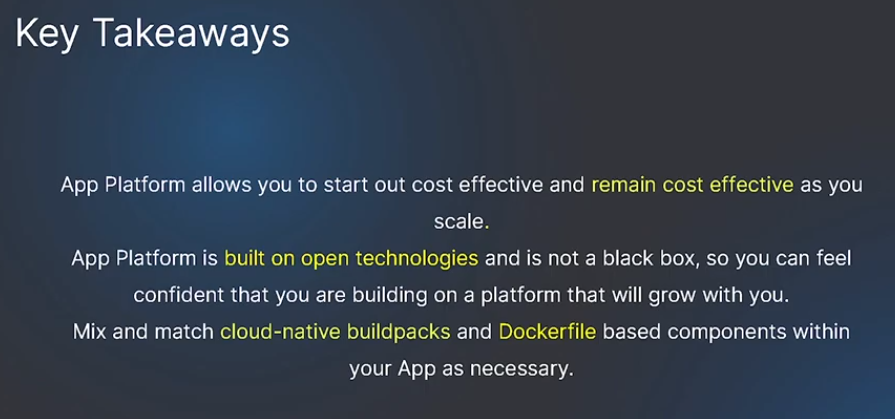
Key Takeaways App Platform allows you to start out cost effective and remain cost effective as you scale. App Platform is built on open technologies and is not a black box, SO you can feel confident that you are building on a platform that will grow with you. Mix and match cloud-native buildpacks and Dockerfile based components within your App as necessary.
2022-11-21_14-53-57_screenshot.png #
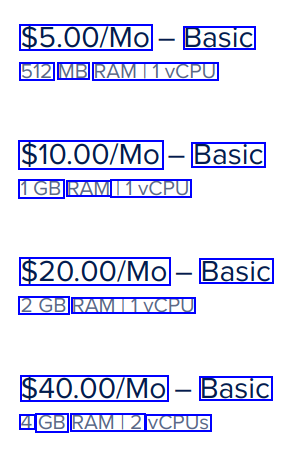
$5.00/Mo Basic 512 MB RAMI1VCPU $10.00/Mo Basic 1GB RAM 11VCPU $20.00/Mo Basic 2GB RAMI1VCPU $40.00/Mo Basic 4 GB RAMI2 VCPUS
2022-11-21_14-38-42_screenshot.png #
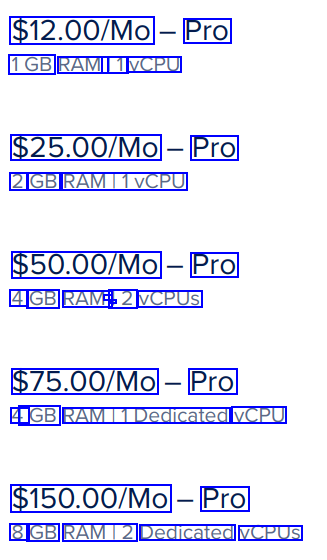
$12.00/Mo Pro 1GB RAM 11 VCPU $25.00/Mo Pro 2 GB RAMI1VCPU $50.00/Mo Pro 4 GB RAM - 12 - VCPUS $75.00/Mo Pro 4 GB RAMI1Dedicated VCPU $150.00/Mo Pro 8 GB RAMI2 Dedicated VCPUS
2023-04-06_15-03-06_screenshot.png #
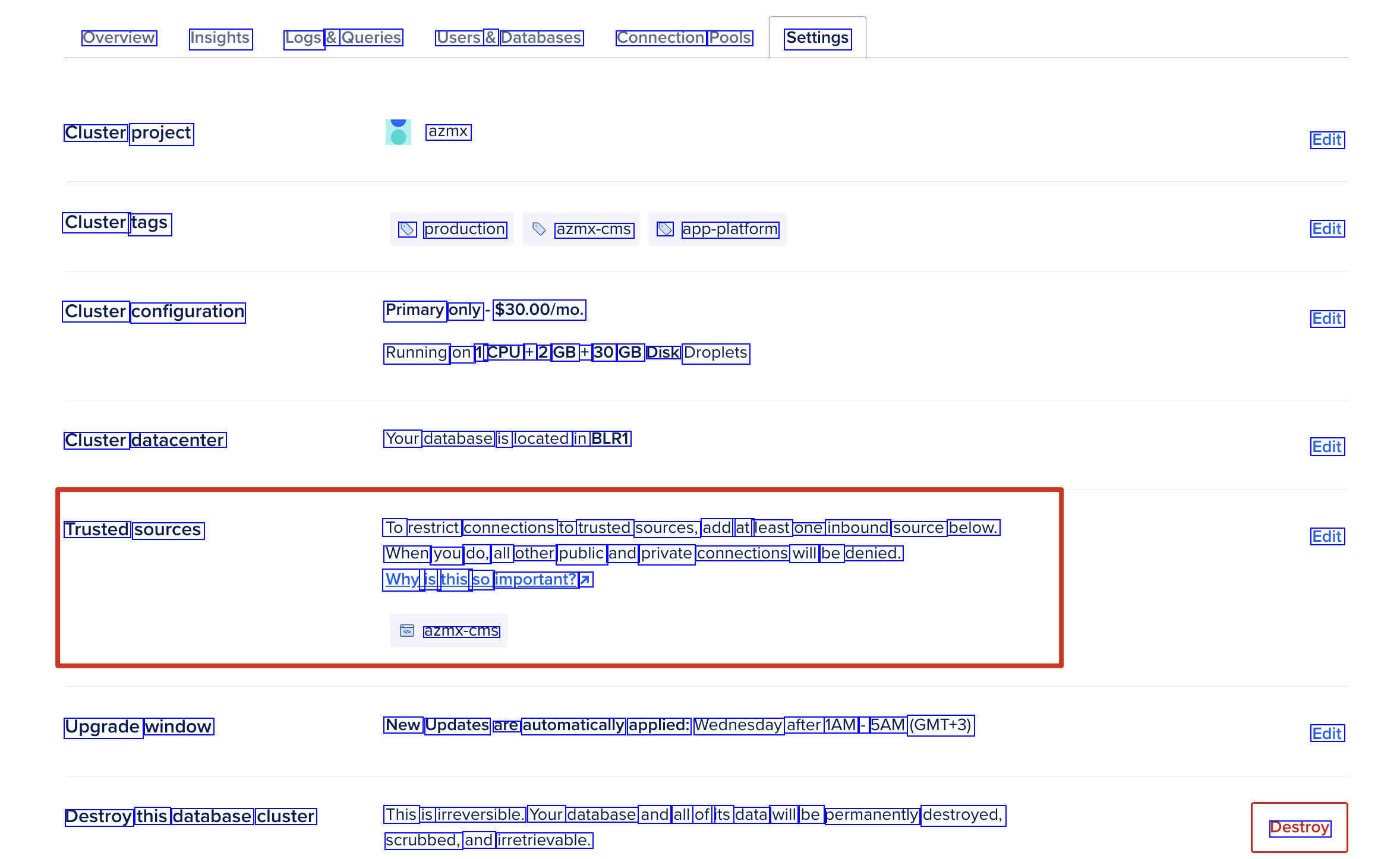
Overview Insights Logs & Queries Users & Databases Connection Pools Settings Cluster project azmx Edit Cluster tags D production azmx-cms D app-platform Edit Cluster configuration Primary only $30.00/mo. Edit Running on 1 CPU + 2 GB + 30 GB Disk Droplets Cluster datacenter Your database is located in BLR1 Edit Trusted sources To restrict connections to trusted sources, add at least one inbound source below. When you do, all other public and private connections will be denied. Edit Why is this SO important? 7 azmx-cms Upgrade window New Updates are automatically applied: Wednesday after 1AM - 5AM (GMT+3) Edit Destroy this database cluster This is irreversible. Your database and all of its data will be permanently destroyed, Destroy scrubbed, and irretrievable.
2023-04-06_15-03-43_screenshot.png #

Trusted sources Edit Your cluster currently accepts any incoming connection over the public network before authentication. To restrict connections to trusted sources, add at least one inbound source below. When you do, all other public and private connections will be denied. Why is this sO important? Warning: Your cluster is open to all incoming connections.
2023-04-06_15-05-06_screenshot.png #

Trusted sources To restrict connections to trusted sources, add at least one inbound source below. Edit When you do, all other public and private connections will be denied. Why is this SO important? 1 azmx-cms-test € 176.45.59.42