Postgres
- tags
- ,
Summary #
PostgreSQL is a powerful, object-relational database system with over 35 years of active development that has earned it a strong reputation for reliability, feature robustness, and performance ref
why use it? #
Technical configurations #
Change default port #
change the `port` in `/etc/postgresql/14/main/postgresql.conf`
Change data directory location #
To avoid storage problem I followed this tutorial.
# /etc/postgresql/14/main/postgresql.conf
# data_directory = '/var/lib/postgresql/14/main'		# use data in another directory
data_directory = '/mnt/0d08b147-6cb2-4978-b2a0-b78f2786f72d/data/postgresql/14/main'
Performance Improvements #
Connection Pooling #
- When a client connects directly to a PostgreSQL database, the server forks a process to handle the
connection.
- PostgreSQL databases have a fixed maximum number of connections, and once that limit is hit, additional clients can’t connect.
- Additionally, each active connection uses about 10 MB of RAM.
You can mitigate potential performance issues from PostgreSQL’s connection limits and memory requirements by using connection pooling.
Note: Just creating connection pool in is not enough, after creating the client, like Django application, should use the connection parameters of this connection pool instead of direct database.
When to use connections to improve performance
A connection pool may be useful if your database:
- Typically handles a large number of idle connections,
- Has wide variability in the possible number of connections at any given time,
- Drops connections due to max connection limits, or
- Experiences performance issues due to high CPU usage.
Connection pooling funnels client connections into a pooling application, which reduces the number of processes a database has to handle at any given time. The pooling application passes on a limited number of connections to the database and queues additional connections for delivery when space becomes available.
Storing Immutable data #
Stackoverflow The solution is to give the user that accesses the database only the INSERT and SELECT privilege on the tables involved.
Installation on #
Install the server
brew install postgresql
# run service
brew services start postgresql
install admin client
installing pgadmin4 #
brew install pgadmin4
Creating admin user #
Create user “postgres” without password
createuser postgres --interactive

# or make a superuser postgresl just with
createuser postgres -s

# psql
psql -U postgres
As #
is 15.2.
as Service #
#
#
#
#
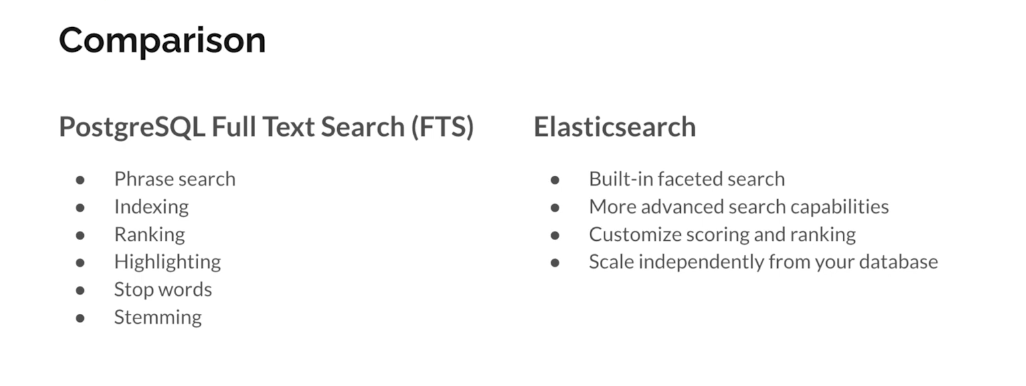
postgresql vs #
#
Links to this note
- psql
- Superset
- Postgres in DO
- Prisma
- Django on OCI
- pgadmin
- lexeme
- pg_trgm
- Django Migrations
- PostGIS
- Amazon Aurora
- pgvector
- dj-database-url
- Mayan-EDMS
- paperless-ngx
- vanna.ai
- Full Text Search with Django
- papermerge
- Oracle Cloud Infrastructure
- Budibase
- Deploying Django application on DO app platform
- Camunda Workflow Engine
- PgBouncer
- DigitalOcean