Wagtail
CMS #
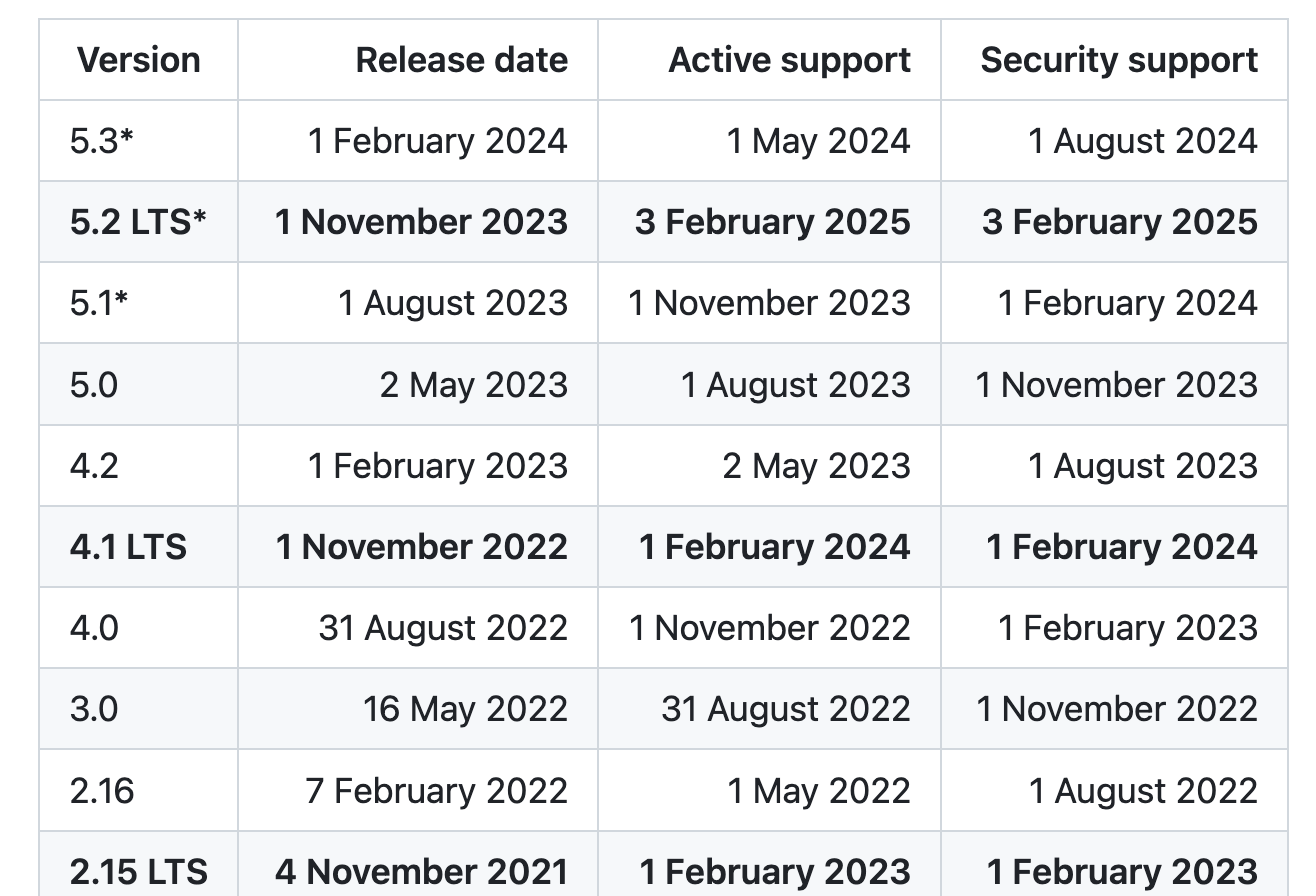
https://wagtail.org/ features Release schedule and LTS versions
Creating Project #
Commands #
When wagtail project’s root dir is not created
wagtail start name_of_projectWhen directory is already created
wagtail start site_name project_root_dir_namewagtail start mysite project_root_dir_name
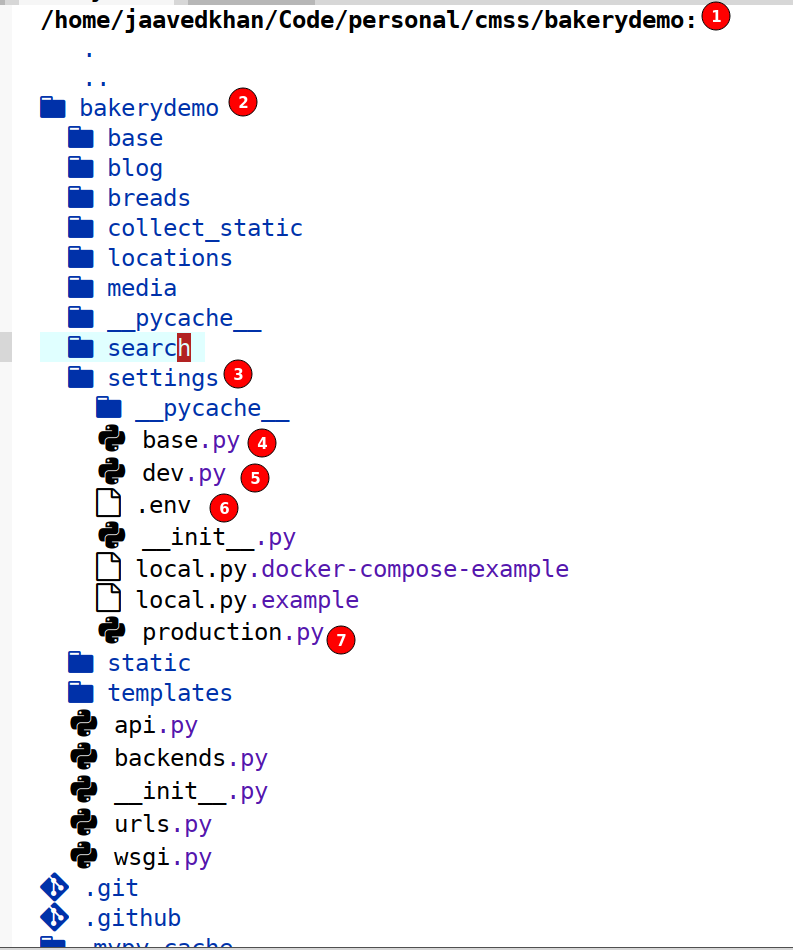
Project structure #
Wagtail Apps #
wagtail-speech #
Text to Speech https://github.com/moorinl/wagtail-speech
wagtail-2fa #
https://pypi.org/project/wagtail-2fa/
wagtail-django-recaptcha #
https://pypi.org/project/wagtail-django-recaptcha/
Moving data from development environment to production #
Worked in 4.0 version
python manage.py dumpdata --natural-foreign --indent 2 \
 -e contenttypes  -e sessions -e auth.permission  \
 -e wagtailcore.grouppagepermission  -e wagtailcore.groupcollectionpermission  -e wagtailimages.rendition  -e wagtailcore.revision -e wagtailcore.pagelogentry \
 -e wagtailcore.site -e wagtailcore.locale -e wagtailcore.collection -e wagtailcore.workflowpage -e wagtailcore.workflowtask -e wagtailcore.task -e wagtailcore.workflow \
 -e auth.group -e auth.user \
 -e wagtailcore.groupapprovaltask -e wagtailusers.userprofile \
 -o /tmp/azmx.json
Worked in Wagtail 5.0 Version
python manage.py dumpdata --natural-foreign --indent 2 -e contenttypes -e sessions -e auth.permission -e wagtailcore.grouppagepermission -e wagtailcore.groupcollectionpermission -e wagtailimages.rendition -e wagtailsearch.query -e wagtailsearch.querydailyhits -e wagtailcore.modellogentry -e wagtailsearch.indexentry -e wagtailcore.referenceindex -e wagtailcore.pagelogentry -e wagtail_localize.translationlog -o /tmp/azmx_new.json
Features #
RichText Field or RichTextBlock #
Wagtail provides a general-purpose WYSIWYG editor for creating rich text content (HTML) and embedding media such as images, video, and documents.
This was used in Azm X CMS to give WYSIWYG editor in the CMS.
StreamFields #
StreamField provides a content editing model suitable for pages that do not follow a fixed structure – such as blog posts or news stories – where the text may be interspersed with subheadings, images, pull quotes and video. It’s also suitable for more specialised content types, such as maps and charts (or, for a programming blog, code snippets). In this model, these different content types are represented as a sequence of ‘blocks’, which can be repeated and arranged in any order.
For further background on StreamField, and why you would use it instead of a rich text field for the article body, see the blog post Rich text fields and faster horses.
Difference between RichTextField and StreamFeilds #
It is recommended to StreamFeilds with wagtail, although there is an option to use RichTexField WYSIWYG but using them for the CMS will lose the semantic value of its content - Wagtail is for content management, if the content follows semantic structure, it will be easier to make the content headless and consume them from other places.
Semantic Value #
By “semantic value”, I mean that we are recording information about what the page content means, not just its styling: essentially, the data we store should be as close as possible to the information the editor has in their head. In other words: “this event is on the 14th of May”, not “there is a second-level heading here saying Thursday 14th May 2014” (or worse: “there is some left-justified text in 16-point Helvetica Neue here saying Thursday 14th May 2014”). That way, if we suddenly decide that all our dates should be displayed as third-level headings in American mm/dd/yy format (goodness knows why), or want to produce a list of upcoming events, we have the information to do that. ref
Release dates, schedules and LTS version #
https://github.com/wagtail/wagtail/wiki/Release-schedule
CSP #
weeken or loosen the CSP policy for the wagtail admin to make functional following: https://github.com/wagtail/wagtail/issues/1288#issuecomment-1303586998 The result was the mozilla observatory scan still was showing A+ grade although the admin path’s CSP was changed.